

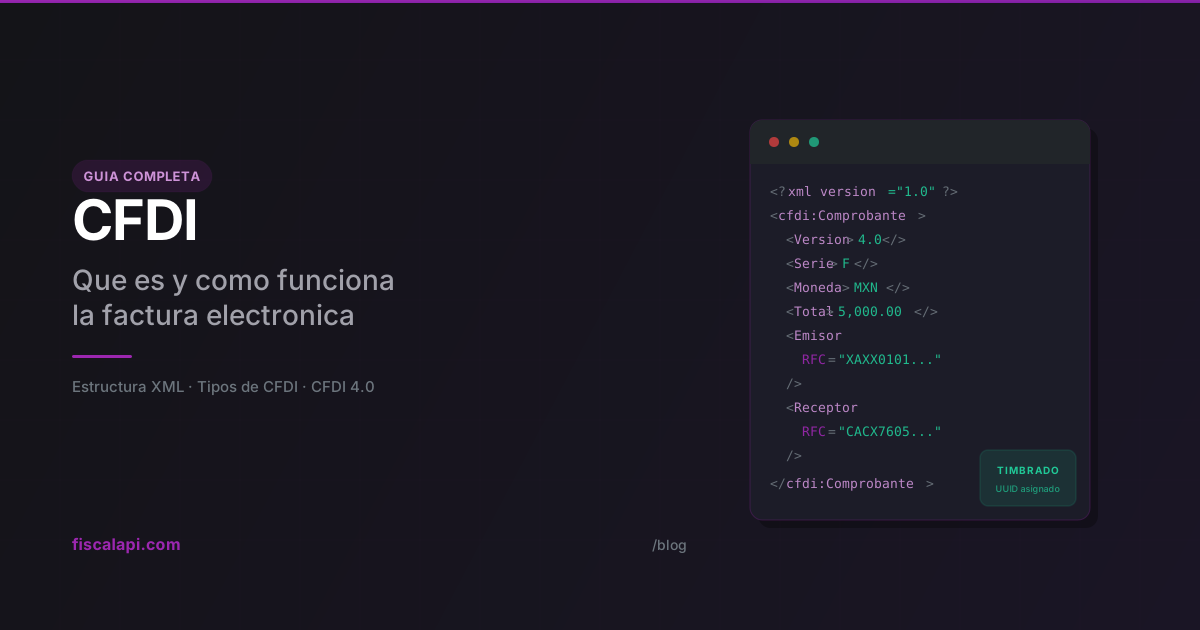
CFDI: What It Is and How It Works in Mexico
2 de abril de 2026
Every commercial transaction in Mexico that needs to be tax-deductible requires a CFDI. If you're building software that handles payments, electronic invoicing, payroll, or logistics in Mexico, this isn't optional. The CFDI is the backbone of the country's entire tax compliance system, and understanding how it works will save you from a lot of rejected stamps and confused clients.
What is a CFDI
CFDI stands for Comprobante Fiscal Digital por Internet, which translates to Digital Tax Receipt via Internet. It's an XML document that records a taxable transaction, digitally signed by the issuer and certified by a government-authorized provider called a PAC (Proveedor Autorizado de Certificacion).
Here's what trips up most people outside Mexico: CFDI doesn't just mean "invoice." An invoice is one type of CFDI. But payroll receipts, credit notes, payment confirmations, and goods transfer documents are all CFDIs too. The term covers every standardized fiscal document that the SAT (Mexico's tax authority, like the IRS) uses to track economic activity.
The current version is CFDI 4.0, mandatory since January 2023. No PAC will stamp anything in an older format.
How CFDI works
The issuance flow involves three parties: the issuer (you), the PAC, and the SAT.
The critical step is the timbrado (stamping). When the PAC validates your XML and everything checks out, it assigns a UUID (the folio fiscal) and attaches a digital tax stamp (sello digital). That UUID becomes the permanent identifier for the document. Cancellations, status queries, verification, everything references that UUID.
The PAC does more than stamp. It validates that the issuer's RFC is active, that the tax regime matches what's registered with SAT, that the usage codes and payment form codes exist in the current catalog. One wrong code and the whole thing gets rejected.
Nobody builds the XML by hand in production. You either use invoicing software or an API like Fiscalapi that handles XML construction, PAC communication, and returns the stamped CFDI ready to deliver.
Types of CFDI
The typeCode field determines what kind of fiscal document you're issuing. Each type serves a different purpose.
The standard sales invoice. You issue this when you charge for a product or service. If a client buys a software license for $5,000 MXN, you generate an Ingreso CFDI with the amount, applicable taxes (IVA, ISR withholding if relevant), and the client's fiscal data.
This is the type most people mean when they say "factura."
Structure of a CFDI
A CFDI is an XML document with a structure defined by the SAT's official XSD. The root element is Comprobante, and inside it, nodes represent each part of the transaction. This is the actual hierarchy:
Comprobante: the root node
The Comprobante element holds the global attributes of the CFDI. These are the most important ones:
| Attribute | Required | Description |
|---|---|---|
Version | Yes | Always "4.0" |
Serie | No | Internal control series (e.g., "F", "NC") |
Folio | No | Internal control folio |
Fecha | Yes | Issuance date and time (YYYY-MM-DDThh:mm:ss) |
FormaPago | No | Payment form code (01 cash, 03 wire transfer, 04 credit card, 99 to be defined) |
MetodoPago | No | PUE (single payment) or PPD (deferred/installment) |
SubTotal | Yes | Sum of line item amounts before taxes and discounts |
Descuento | No | Total discounts before taxes |
Moneda | Yes | ISO 4217 currency code (MXN, USD) |
TipoCambio | No | Exchange rate when currency is not MXN |
Total | Yes | Total amount of the receipt |
TipoDeComprobante | Yes | CFDI type: I (Income), E (Credit Note), T (Transfer), N (Payroll), P (Payment) |
Exportacion | Yes | Export code (01 N/A, 02 Definitive, 03 Temporary) |
LugarExpedicion | Yes | Zip code of the issuance location |
Sello | Yes | Issuer's digital seal (Base64) |
NoCertificado | Yes | CSD certificate number (20 digits) |
Certificado | Yes | Digital seal certificate (Base64) |
FormaPago and MetodoPago are constantly confused. FormaPago is how you got paid (transfer, card, cash). MetodoPago is when: PUE if already paid, PPD if they'll pay later. Setting FormaPago="99" with MetodoPago="PUE" will get rejected by the PAC. Form 99 only works with PPD.
Emisor (Issuer)
Fiscal data of whoever issues the receipt.
| Attribute | Required | Description |
|---|---|---|
Rfc | Yes | Issuer's RFC (tax ID) |
Nombre | Yes | Exact legal name as registered with SAT |
RegimenFiscal | Yes | Tax regime code (601, 612, 626, etc.) |
Receptor (Recipient)
Fiscal data of whoever receives the receipt. In CFDI 4.0, the recipient node requires significantly more data than before.
| Attribute | Required | Description |
|---|---|---|
Rfc | Yes | Recipient's RFC |
Nombre | Yes | Exact legal name as it appears in their Constancia de Situacion Fiscal |
DomicilioFiscalReceptor | Yes | Recipient's fiscal address zip code |
RegimenFiscalReceptor | Yes | Recipient's tax regime code |
UsoCFDI | Yes | CFDI usage code (G03, G01, S01, etc.) |
The most common production error is a recipient name mismatch. "EMPRESA SA DE CV" is not the same as "EMPRESA, S.A. DE C.V." for stamping purposes. Always verify the recipient's fiscal data against their Constancia de Situacion Fiscal before issuing.
Conceptos (Line Items)
Each Concepto inside the Conceptos node describes one line of the receipt: a product sold or a service rendered.
| Attribute | Required | Description |
|---|---|---|
ClaveProdServ | Yes | SAT product/service catalog key |
Cantidad | Yes | Quantity of the good or service |
ClaveUnidad | Yes | SAT unit of measure key (E48 service, H87 piece, etc.) |
Descripcion | Yes | Description of the good or service |
ValorUnitario | Yes | Unit price |
Importe | Yes | Quantity × Unit price |
Descuento | No | Discount applied to this line item |
ObjetoImp | Yes | Whether the item is subject to tax (01 No, 02 Yes, 03 Yes but not required to itemize) |
Each Concepto can contain its own Impuestos node with transfers (IVA, IEPS) and withholdings (ISR, withheld IVA) at the line level. It can also include InformacionAduanera for imports, CuentaPredial for real estate, and Parte to break down components of a kit or package.
Impuestos (Global Tax Node)
The Impuestos node at the Comprobante level consolidates all taxes from all line items. It contains:
TotalImpuestosTrasladados: sum of all transferred IVA and IEPSTotalImpuestosRetenidos: sum of all ISR and IVA withholdingsTrasladoandRetencionnodes grouped by tax type, rate, and factor type
Complemento and Addenda
The Complemento node is the SAT's extension point for mandatory additional information. This is where the Timbre Fiscal Digital (digital tax stamp) goes when the PAC stamps the CFDI, and where CFDI complements live (payment, payroll, carta porte, foreign trade, etc.). It's defined as xs:any, meaning it accepts any XML that conforms to a SAT-registered XSD schema.
The Addenda node is similar but for private commercial use between issuer and recipient. It has no fiscal validity; it's where companies add extra information like purchase order numbers, cost centers, or logistics data that their ERP needs.
CFDI 4.0: the current version
Version 4.0 became mandatory on January 1, 2023. The biggest changes from 3.3 hit the recipient data requirements hard.
Previously, you could get away with just the recipient's RFC and a generic usage code. Now you need their full legal name, RFC, fiscal domicile (zip code), and tax regime. This broke integrations everywhere because most systems didn't collect that level of detail from clients. For companies building tax compliance into their software, it meant reworking entire onboarding flows to capture the extra fields.
A mandatory export field was added to every CFDI, even if you don't export anything (set it to 01 - Not Applicable in that case).
Cancellation rules changed significantly. You can no longer cancel a CFDI unilaterally after 24 hours. The recipient has to accept the cancellation, except for amounts under $1,000 MXN.
Starting in 2026, every CFDI must back a real, existing operation. The SAT calls this "materialidad" (materiality): they can now verify that the transaction actually occurred. A stamped CFDI alone isn't proof of anything anymore; you need to demonstrate that the service was rendered or the product was delivered.
CFDI Complements: how electronic invoicing evolved
When electronic invoicing started in Mexico, the CFDI only needed to represent two things: an income invoice (Ingreso) and a credit note (Egreso). That initial model worked for the first years. But fiscal reality is more complex than that: there are deferred payments, payroll, freight and goods transfer, foreign trade, and dozens of operations that the tax authority needs to track in detail.
The original Ingreso/Egreso model wasn't enough to capture all that information. The SAT's solution was to create CFDI complements (complementos): sub-XMLs that are inserted inside the main XML to represent specific real-world fiscal concepts.
How the complement architecture works
The main CFDI XML is defined by the Comprobante element (its official schema is the CFDI 4.0 XSD). Inside that XML there's a node called Complemento, and that's where complement sub-XMLs are inserted. Each complement has its own XSD schema, its own validation rules, and its own required fields. It's literally another XML inside the XML.
The most important complements
Represents a payment received by the beneficiary from the debtor. Used when an invoice was issued with payment method PPD (deferred or installment payment) and the payment happens later. The complement contains all the event information: payment amount, date it occurred, payment form used, bank accounts involved, and the reference to the original CFDI being paid.
Every time you receive a partial or deferred payment, you issue a Pago (P) type CFDI with this complement inside. It's the document that tells the SAT: "this money has changed hands."
Full guide: Payment complement: practical guide
There are more complements beyond these three: foreign trade, INE (electoral), fiscal legends, among others. But payments, payroll, and carta porte cover the vast majority of operations a developer will integrate. Each complement has its own XSD published by the SAT and its own construction rules independent of the base CFDI.
CFDI frequently asked questions
Issuing a CFDI with Fiscalapi
Building the XML, validating against SAT's catalog, communicating with the PAC, handling the response: doing all of this from scratch is not a good use of your time. Fiscalapi wraps the entire flow into a single API call and returns the stamped XML, UUID, and PDF in the response. Cancellations, status checks, and PDF downloads all use the same invoice id you get back. SDKs are available for C#, Node.js, Python, PHP, and Java -- check the documentation to get started or browse working examples on GitHub.
The sandbox environment at test.fiscalapi.com lets you stamp CFDIs at no cost with no fiscal consequences. It simulates SAT's full behavior, including RFC and tax regime validation. Use it before pointing anything at production. The full API documentation covers every endpoint from issuance to cancellation.