

SAT bulk download web service: how it works
April 4, 2026
Downloading CFDIs (Mexico's electronic invoices) from the SAT (Mexico's tax authority, Servicio de Administración Tributaria) in volume is one of those tasks that seems simple until you try it. The SAT bulk download web service (bulk download: the SAT service that delivers the CFDIs a taxpayer issued and received) uses SOAP, requires the e.firma (the SAT advanced electronic signature that identifies a taxpayer, formerly FIEL) to authenticate, has unpredictable timeouts, and sometimes doesn't respond at all. I've built integrations with this service more than once, and every time I end up wondering why the SAT picked the most developer-hostile architecture possible.
But the service exists, it works (most of the time), and if you need hundreds or thousands of issued or received invoices, it's the only official option.
What the SAT bulk download web service is
Bulk download is a SAT web service that returns the XML of every CFDI issued or received by an RFC (Mexico's taxpayer ID, Registro Federal de Contribuyentes) within a date range. In the SAT's own documentation it's the descarga masiva web service. Unlike the SAT portal, where you download invoices one at a time, the bulk service packs thousands of CFDIs into ZIP files you can process programmatically.
The service runs on two SAT hosts: https://cfdidescargamasivasolicitud.clouda.sat.gob.mx/ for authentication, requests, and verification, and https://cfdidescargamasiva.clouda.sat.gob.mx/ for downloads. It exposes four SOAP services that you have to call in sequence. There are no shortcuts. There's no alternative REST API. It's SOAP with WS-Security and XML signatures.
The SAT bulk download limits cap each request at 200,000 CFDIs. Fiscalapi also limits each request to a date range of 31 days (one month), so a whole fiscal year takes 12 separate requests. Each request can take anywhere from seconds to hours to process, depending on the volume.
The download process, step by step
Authenticate with your e.firma#
The first service handles authentication. You send a token signed with your e.firma and get back a session token that's valid for 5 minutes. Yes, 5 minutes. If your request takes more than 5 minutes to prepare, you need to authenticate again. The web service authenticates with the e.firma, not with the CSD (Certificado de Sello Digital, the digital seal certificate used to sign CFDIs) you use to seal invoices.
The signature follows the XML Signature standard with the RSA-SHA256 algorithm. Your certificate (.cer) and private key (.key) sign the SOAP request.
Send the CFDI download request#
With an active token, you send a request that specifies the issuer's or recipient's RFC, the date range, the download type (issued or received), and, optionally, the CFDI type (the TipoDeComprobante key: I income, the regular sales invoice; E credit note; T transfer, moves goods without a sale; N payroll; P payment).
The SAT returns an IdSolicitud, the identifier of your queued request. The download isn't instant. The SAT processes your request in the background.
With the IdSolicitud, you poll periodically to see whether your request has been processed. The possible statuses are Aceptada (queued), EnProceso, Terminada, Error, Rechazada, and Vencida.
When the status is Terminada, the response includes one or more IdPaquete values, which are the ZIP files ready to download.
For each IdPaquete, you call the download service. You get a Base64-encoded ZIP file that contains the CFDI XMLs.
The ZIP files contain the individual XML of each CFDI. How you process them is up to you: store them in a database, extract accounting data, check them against your records, or whatever your system needs.
Technical flow of the service
SAT portal vs API: two different worlds
SAT portal (manual)
You sign in to the SAT portal, pick a date, and download invoices one at a time. For 10 invoices it works. For 1,000 it's not viable.
The portal has a per-session download limit and signs you out often. If you need invoices from several months, get ready to spend hours clicking.
Useful for: checking a specific CFDI, one-off downloads.
Bulk download web service (automatic)
Programmatic authentication, requests by date range, downloads in ZIP batches. Built for volume.
You have to implement XML signing, handle asynchronous statuses, and deal with the SAT's timeouts. The barrier to entry is high, but once it's built, you scale with no practical limit.
Useful for: account reconciliation, audits, data migration, systems that need every CFDI.
Why the SAT service is hard to use
I won't sugarcoat it. The SAT bulk download service is technically hostile, for several concrete reasons:
SOAP instead of REST. In 2026, most modern APIs are REST with JSON. The SAT uses SOAP with XML, namespaces, envelopes, and WS-Security. Every request means building a complex XML document with a cryptographic signature.
XML signature with RSA-SHA256. Sending your certificate as a header isn't enough. You have to sign the body of the SOAP envelope with the XML Signature standard. Doing it right involves C14N canonicalization, a SHA256 digest, and an RSA signature with your e.firma private key. One mistake at any step and the SAT rejects you without a useful error message.
Asynchronous with no webhooks. The SAT doesn't notify you when your request is ready. You have to poll every 30-60 seconds until the status changes. Sometimes it takes 2 minutes. Sometimes it takes 6 hours. There's no way to predict it.
5-minute tokens. The session token expires after 5 minutes. If your request takes longer to process (which is normal), you have to authenticate again to check the status and download.
The SAT service has unannounced maintenance windows, especially in the last days of the month and during annual tax return season (March and April). If your system depends on real-time downloads, you need retry handling and a request queue.
Bulk download with Fiscalapi
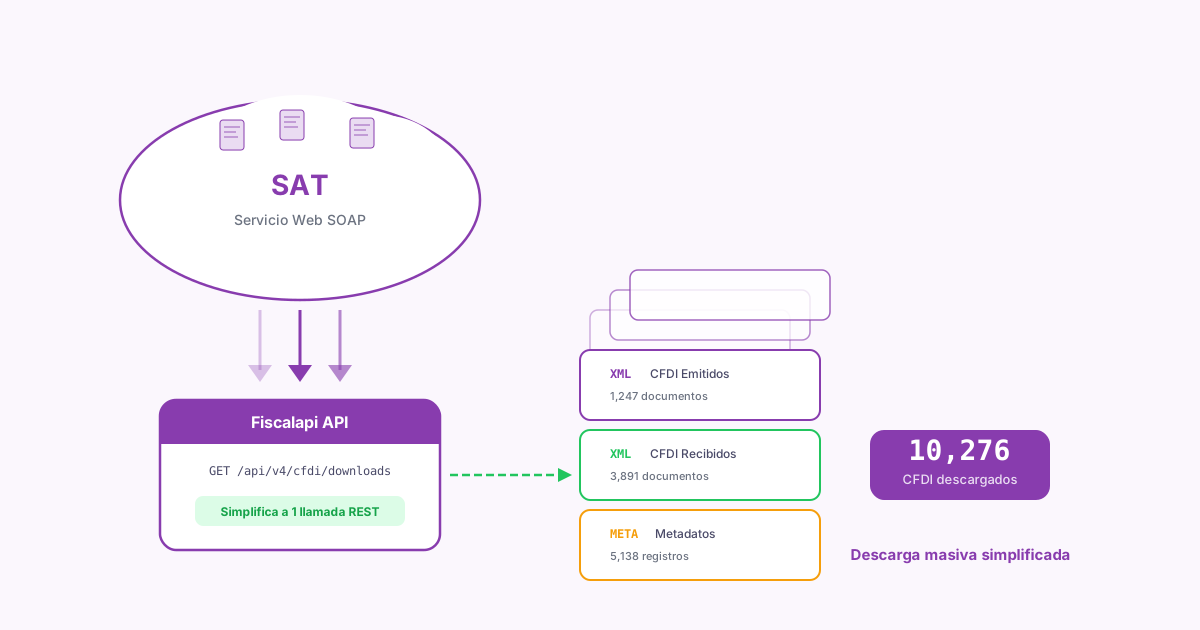
Fiscalapi hides all the complexity of the SAT's SOAP service. You send a REST request with JSON, and Fiscalapi handles the authentication, the XML signature, the polling, and the download.
With Bulk CFDI download, you create a download rule for the RFC and the download type, and a download request with the date range, all through REST requests. You upload the taxpayer's e.firma to Fiscalapi once. The API takes care of the SOAP authentication, the XML signature, automatic polling, and downloading the ZIP packages when the SAT has them ready. See the available SDKs to integrate bulk download in your preferred language.
Fiscalapi retries automatically when the SAT doesn't respond. If the bulk service is down or slow, requests are queued and retried without your application having to implement that logic. You can check the status of each request in the Fiscalapi dashboard.
Common bulk download errors
"No se encontró la información" (No information found, code 5004). This can mean there are no CFDIs in the range, but it can also be a silent error if authentication partially failed or the download type doesn't match. Check that the RFC, the dates, and the download type (issued or received) are correct.
Request rejected for exceeding the limit. In practice, the SAT limits how many active requests an RFC can have. If you already have queued requests you haven't downloaded, new ones get rejected. Download the pending packages before you send new requests.
Corrupt or empty ZIP. Every so often the SAT returns packages that can't be unzipped. Download the package again first (the SAT allows two downloads per package within 72 hours). If it's still corrupt, request the same date range again so the SAT generates new packages.
Frequently asked questions about bulk download
Bulk download isn't glamorous, but it's essential for any serious accounting system. If you process more than 50 invoices a month, automating this flow saves you hours of manual work and eliminates reconciliation errors. See the Fiscalapi documentation for the specific endpoints and advanced filtering options.