


Carta Manifiesto SAT: what it is and how to sign it
April 26, 2026
If your PAC (Proveedor Autorizado de Certificación, a SAT-authorized provider that stamps CFDIs) started asking you for a Carta Manifiesto (the letter in which a taxpayer authorizes its PAC to certify its CFDIs) and you'd never heard the term, nobody made it up overnight. The Carta Manifiesto SAT requirement (SAT: Mexico's tax authority, Servicio de Administración Tributaria) comes from Rules 2.7.2.5 and 2.7.2.7 of the 2026 Resolución Miscelánea Fiscal (the SAT's annual tax rules). It applies to every taxpayer whose CFDIs (Mexico's electronic invoices) are certified by an authorized certification provider. No PAC can certify your CFDIs without that letter. Period.
This post covers what you authorize when you sign it, who has to sign, and how Fiscalapi handles sending the Carta Manifiesto in bulk when your platform has one, ten, or five thousand issuer RFCs (Mexico's taxpayer IDs, Registro Federal de Contribuyentes).
What is the Carta Manifiesto
The Carta Manifiesto is a document in which a taxpayer authorizes its PAC to certify, and deliver to the SAT, the CFDIs issued in its name through an invoicing platform. The taxpayer signs it with their e.firma (the SAT advanced electronic signature that identifies a taxpayer, formerly FIEL), and it stands as a record that the issuer knows and consents to how its certification provider operates.
The document doesn't disable or invalidate CFDIs you've already issued. The authorization covers only the CFDIs that go through stamping (the certification by a SAT-authorized provider that makes a CFDI valid) from then on, and it's kept in the records each PAC maintains under SAT supervision.
The letter doesn't replace your commercial contract with the PAC. They're two different things: the contract governs the business relationship, and the Carta Manifiesto meets a regulatory requirement that the SAT imposes on PACs and their issuers.
What you authorize when you sign the Carta Manifiesto
By signing it, the CFDI issuer agrees to three specific things:
- That its PAC certifies the CFDIs generated through the platform. This includes validating the XML, assigning the UUID (folio fiscal, the unique ID the PAC assigns when it stamps a CFDI), and sealing the CFDI with the SAT's certificate.
- That the PAC delivers to the SAT a copy of the certified CFDIs, as current rules require. The PAC already does this because it has to; the letter documents that the issuer knows about it.
- That the issuer acknowledges a formal requirement that's part of the operation and supervision scheme the SAT applies to every PAC.
None of this changes the stamping mechanics or how you issue your invoices. What changes is that you now have a signed record your PAC can show the SAT when it gets audited, and that's what keeps certification running without hiccups.
Why your PAC asks for it now
The 2026 Resolución Miscelánea Fiscal kept the rules behind this requirement in force, so PACs started collecting signatures across the board to keep their operations aligned with the rules. It isn't unique to Fiscalapi. If you issue CFDIs with any other provider, your PAC will ask you for the same Carta Manifiesto.
As of today, no official deadline has been published. But waiting for the SAT to set a formal deadline and then scrambling to collect signatures is the worst possible strategy, especially if you're an integrator with hundreds of issuer RFCs. Better to close this out before it turns urgent.
If an issuer RFC doesn't sign its Carta Manifiesto and the SAT later sets a formal deadline, its PAC could suspend certification of its CFDIs until it has the signed record. For a business that invoices every day, that means stopping operations.
Who must sign the Carta Manifiesto
The rule is straightforward: each issuer RFC signs its own Carta Manifiesto. You don't sign it per Fiscalapi customer or per corporate group. You sign it per RFC, with the e.firma of that RFC's holder.
In practice, that leads to two scenarios:
For integrators with large customer bases, this is where the real problem shows up. If you have 300 active customers, you need 300 signatures. Asking for them one by one through manual emails isn't viable.
How to sign the Carta Manifiesto in Fiscalapi
Fiscalapi offers three dashboard flows for collecting Carta Manifiesto signatures, plus an API endpoint. The three dashboard flows lead to the same place: a public signing portal at https://fiscalapi.com/manifests/<environment>/<tenantId>, where the signer uploads their e.firma and signs digitally. What sets the flows apart is how the link gets distributed.
Flow 1: Bulk email
From Perfil (Profile), the FIRMAR (Sign) button with the email icon sends an email to the issuers in your tenant (the space in Fiscalapi that holds your issuers, recipients, credits, and data). Each recipient is a person (any individual or legal entity registered in your tenant) who is the issuer on at least one CFDI in your tenant and has an email address on file. It's the right option when you're running the initial collection.
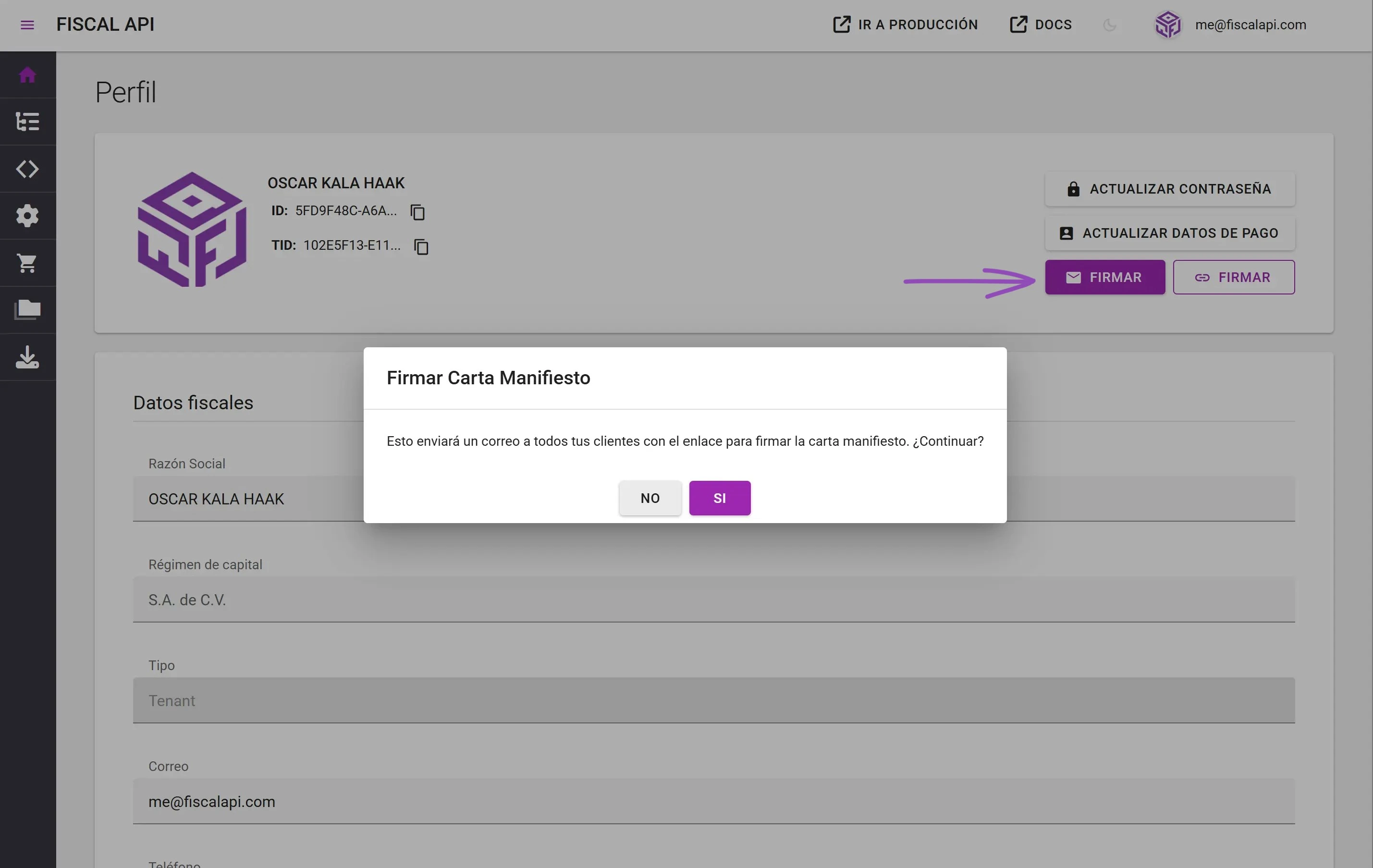
The backend goes through each of those people and sends each one an individual email with the link to the public signing portal. The recipient opens the email, clicks, lands on the portal, uploads their e.firma, and signs. After the signature, Fiscalapi marks that person as signed in your records.
Before you trigger the bulk send, review the people under Catalogos (Catalogs) > Personas (People) and check that their email addresses are up to date. A bulk send to a list with old addresses generates bounces, unnecessary support tickets, and the wrong impression that the system doesn't work.
Flow 2: Individual email
In Catalogos (Catalogs) > Personas (People), the Acciones (Actions) button on each person's row has the Enviar invitación de Carta Manifiesto (Send Carta Manifiesto invitation) option. It sends a single email to the address registered for that customer. The confirmation dialog shows the destination address before sending, so there's no way to send the letter to the wrong customer by accident.
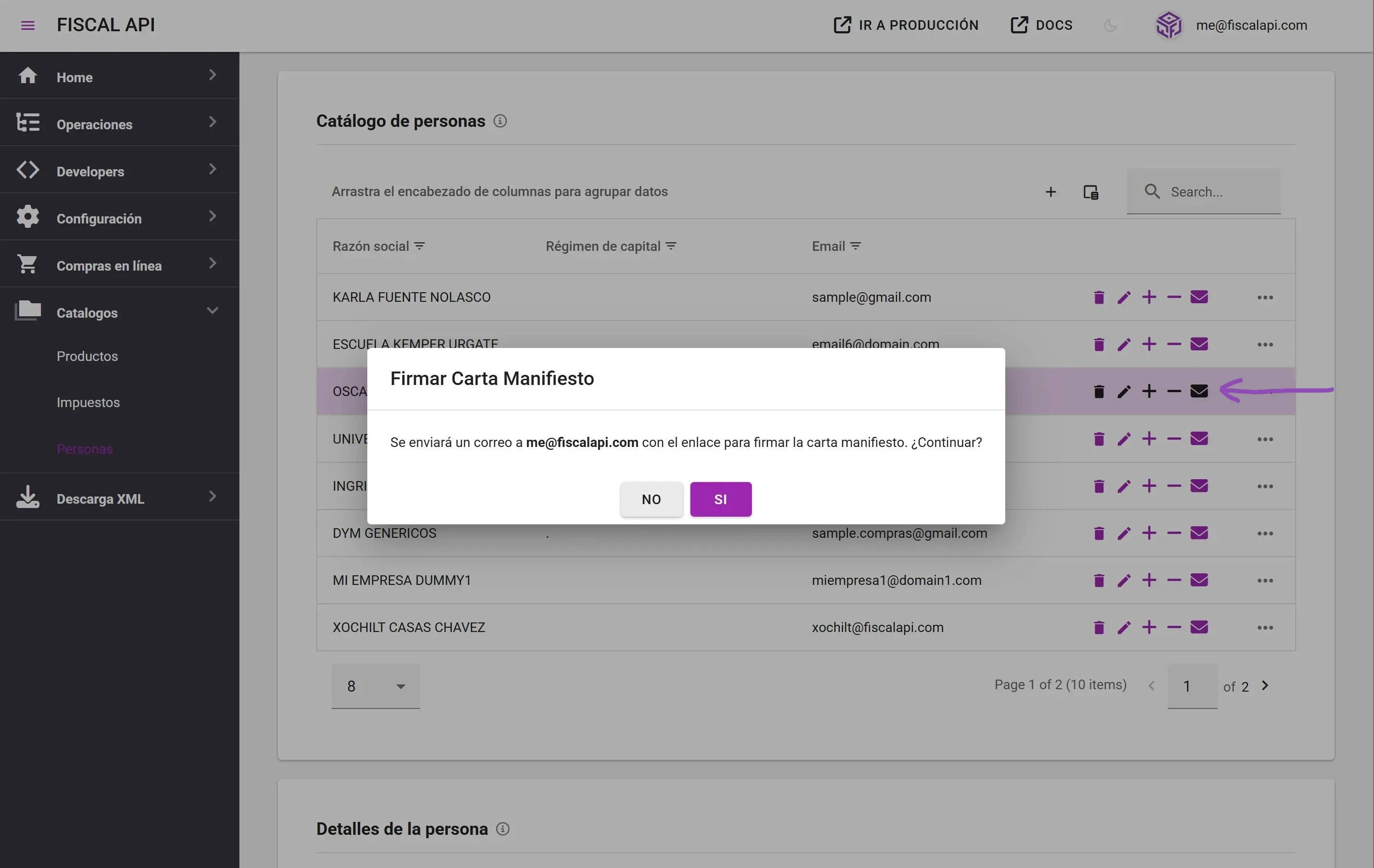
This flow is for one-off cases: onboarding a new customer, resending to someone who didn't finish signing the first time, or a subset of your records that needs the request without notifying everyone else.
Flow 3: Manual link
The second FIRMAR (Sign) button in Perfil (Profile), the one with the link icon, doesn't send emails. It generates the public link to the signing portal, valid for your tenant, and copies it to the clipboard.
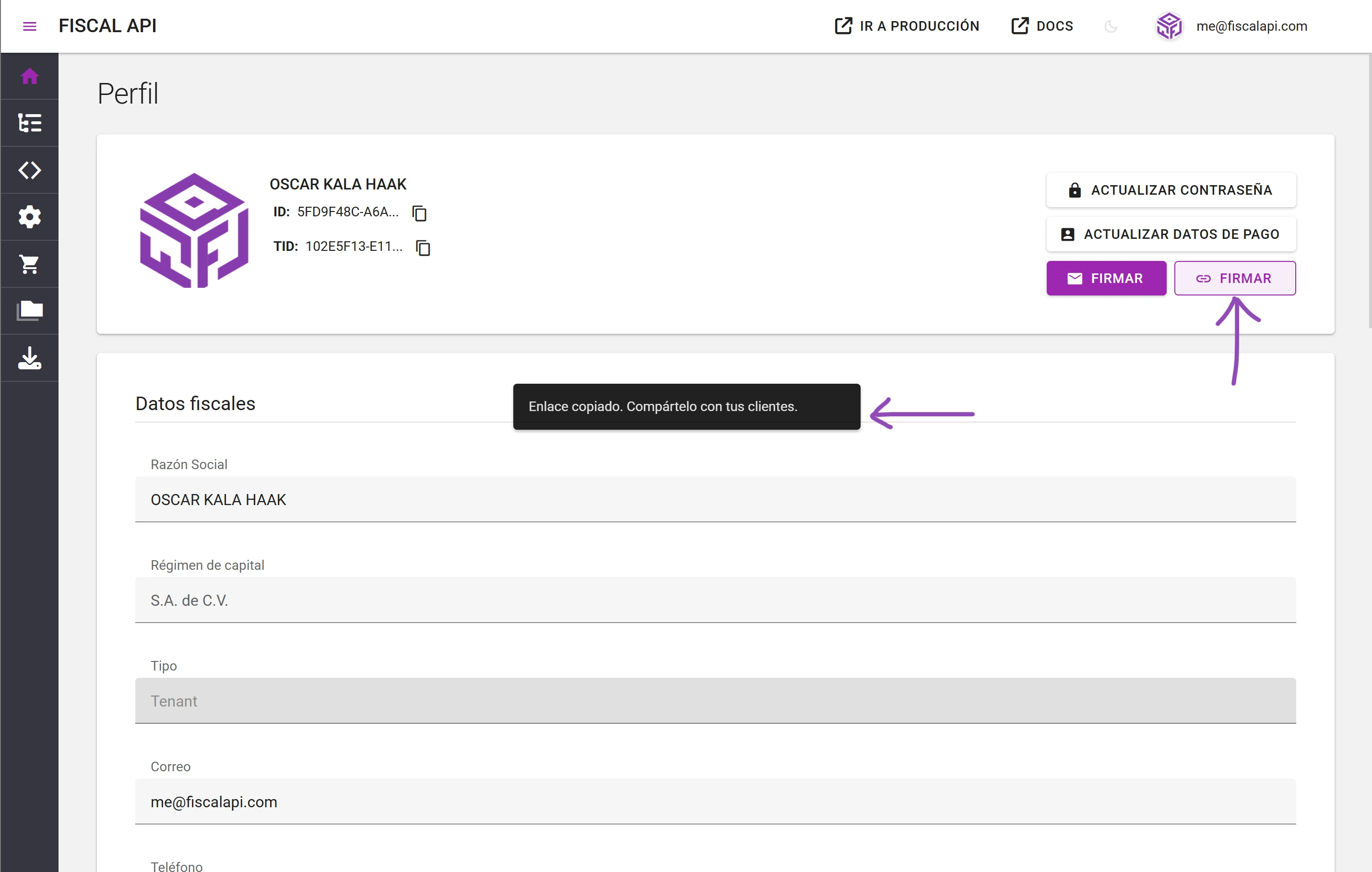
Use it when email isn't the right channel: WhatsApp, Slack, a direct message, a link embedded in your own portal, or a customer who asks for the link during a call. It's the most flexible flow and also the one with the least traceability, because you don't know which address it reached or when it was opened.
Flow 4: Signing through the API
If you need to automate signing without taking the end customer out of your own application (ERP, POS, SaaS, or any other white-label product), Fiscalapi exposes a POST /api/v4/manifests endpoint. It receives the .cer and .key in Base64 plus the password, and returns the signed PDF in Base64, ready to store.
It's the right path when the signer should never leave your application, or when you already have your own e.firma capture flow for other procedures. The endpoint integration and the request structure are covered in the Fiscalapi documentation.
Common destination: the public signing portal
The three dashboard flows take the signer to the same portal at https://fiscalapi.com/manifests/<environment>/<tenantId>. There, the taxpayer reads the Autorización y manifestación de conocimiento (authorization and acknowledgment) text addressed to the PAC, uploads their e.firma, signs, and downloads the signed PDF.
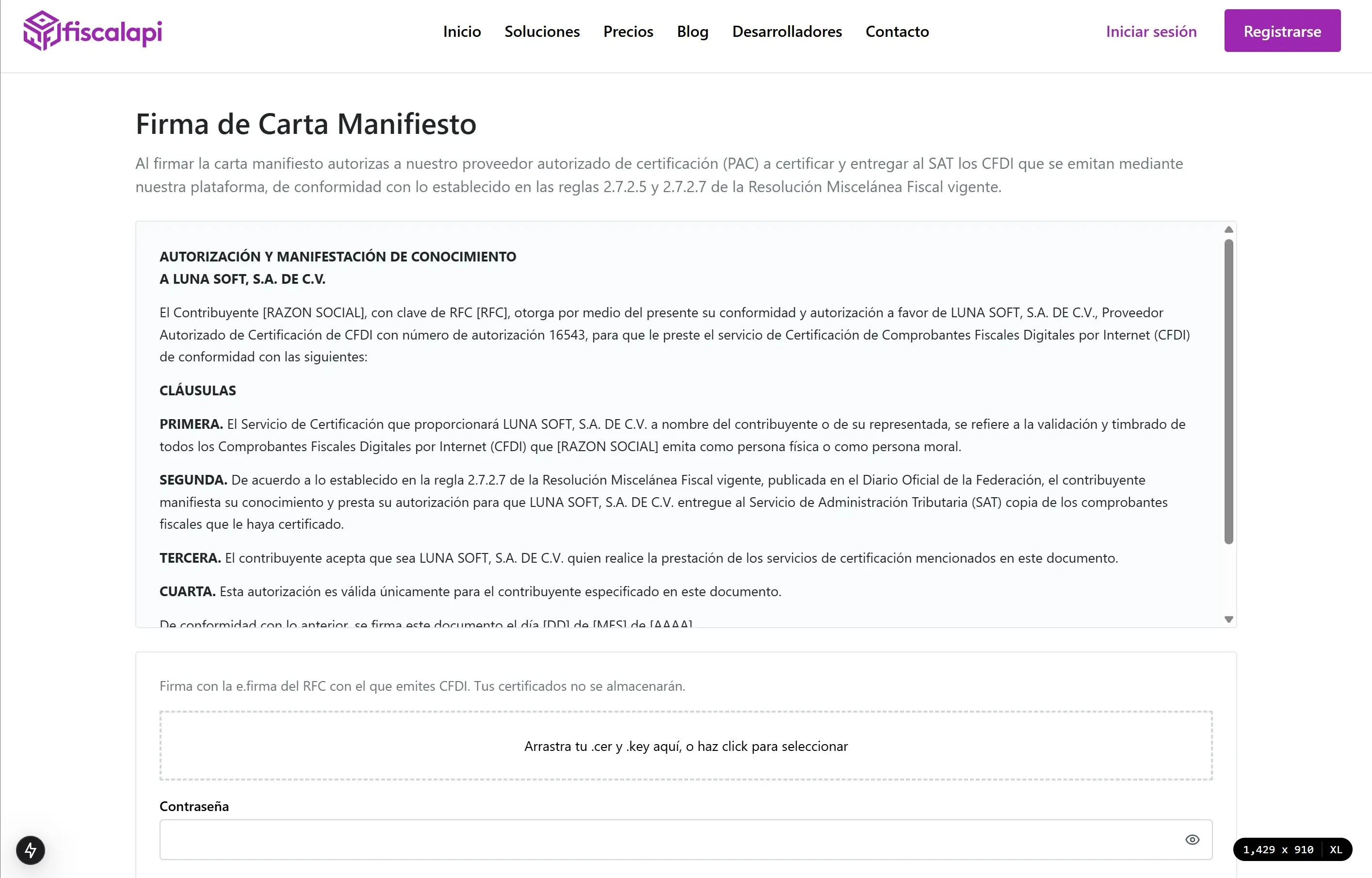
The portal isn't reachable through a random URL. It always requires the tenantId in the path, which guarantees that each signature is tied to the right tenant in the multi-tenant model. If you share the link outside the email flows (Flow 3), make sure you send it to the right customer: the tenantId defines which tenant the signature belongs to.
Which flow fits each case
The main tradeoff is traceability versus control of the channel. Flows 1 and 2 keep a record of the email sent and to whom. Flow 3 gives you full control of the distribution channel at the cost of that traceability. Flow 4 builds the whole process into your application.
| Flow | Entry point | Scope | Traceability | Typical scenario |
|---|---|---|---|---|
| Bulk email | Perfil (Profile) > FIRMAR (Sign), email icon | Every person who is the issuer on a CFDI in the tenant, with an email address | High | Global onboarding, bulk collection |
| Individual email | Catalogos (Catalogs) > Personas (People) > Acciones (Actions) | One selected person | High | One-off onboarding, selective resend |
| Manual link | Perfil (Profile) > FIRMAR (Sign), link icon | You decide | Low | WhatsApp, call, external channel |
| API | POST /api/v4/manifests | One signature per request | Full | ERP, your own portal, white-label |
Use the e.firma, not the CSD
This point gets mixed up a lot, which is why it gets its own section. You sign the Carta Manifiesto only with the e.firma of the RFC's holder. The CSD (Certificado de Sello Digital, the digital seal certificate used to sign CFDIs) won't work, even though the SAT issues it too and it comes as the same .cer and .key file pair.
The reason is technical. The e.firma identifies the individual (persona física) or legal entity (persona moral) to the SAT, and that's what gives legal weight to a signed statement of consent like this letter. The CSD is authorized only to seal CFDIs before stamping. Both certificates carry the Non Repudiation flag, but their Key Usage differs: the e.firma's also includes Data Encipherment and Key Agreement, and the CSD's doesn't. If you upload the CSD to the portal, the system rejects it.
If you mix up the files and upload the CSD thinking it's the e.firma, the portal returns a validation error. Before you start signing, confirm which one you have in hand. The quick way to tell them apart is in the Spanish-language e.firma vs. CSD guide.
In practice, the e.firma file comes named as Clave privada_FIEL_<RFC>.key and the .cer as <RFC>.cer. The CSD has the CSD_ prefix on both files. But files can be renamed, so the reliable criterion is the certificate's Key Usage field, not the file name.
What happens to your e.firma and your certificates
This is the reasonable question any accountant asks before signing: if I upload my e.firma files to a website, what happens to them afterward?
Here's how Fiscalapi handles them:
- The
.cerand.keyfiles are processed in memory on the server side, only to sign the Carta Manifiesto PDF. - Fiscalapi doesn't store the certificates. Once the signed PDF is generated, the files are discarded.
- Fiscalapi doesn't store the e.firma password either. It's used only to open the private key at signing time.
- The resulting PDF goes to the signer for immediate download.
The portal says it explicitly with the notice Tus certificados no se almacenarán (Your certificates won't be stored) above the upload form. The e.firma is still yours, and protecting it is your responsibility. For how to protect these files in general, see our Spanish-language e.firma guide.
The Carta Manifiesto SAT requirement is mandatory
I'll say it plainly because it's what matters: the Carta Manifiesto isn't optional. It's part of the current regulatory requirements for PACs and, by extension, for their issuers. Without the signed letter, your PAC eventually won't be able to certify your CFDIs.
The SAT hasn't published an official deadline yet. But having the signed letter is what keeps your stamping operation running without surprises the day that deadline shows up in the Diario Oficial de la Federación (DOF, Mexico's official gazette). If you're an integrator with a large customer base, that day will come sooner than you think, and you'll be glad you started collecting signatures early.
If you already have a Fiscalapi tenant, go to Perfil (Profile) and trigger the bulk send. If you haven't integrated yet, the documentation for the manifests endpoint has the details to automate the process from your application.