

CFDI stamping: how a PAC certifies an invoice
April 4, 2026
Every e-invoice in Mexico goes through a process that turns it from a plain XML file into a document that's valid for tax purposes. That process is CFDI stamping (CFDI: Mexico's electronic invoice; stamping: the certification by a SAT-authorized provider that makes a CFDI valid). Without it, your CFDI doesn't exist for the SAT (Mexico's tax authority, Servicio de Administración Tributaria), your customer can't deduct it, and your transaction sits in tax limbo. I've spent more than a decade integrating invoicing systems, and I can tell you that most production problems come from misunderstanding how stamping works under the hood, not from business logic.
What is CFDI stamping
CFDI stamping (timbrado CFDI in Spanish) is the process by which a PAC (Proveedor Autorizado de Certificación, a SAT-authorized provider that stamps CFDIs) validates, seals, and registers a CFDI with the SAT. When you stamp an invoice, the PAC checks that the tax data is correct and adds the digital tax stamp (Timbre Fiscal Digital, the SAT seal the PAC adds to a CFDI), also called the TFD. It assigns the CFDI a UUID (folio fiscal, the unique ID the PAC assigns when it stamps a CFDI) and sends a copy of the CFDI to the SAT.
The result is an XML that carries two seals: the issuer's, made with your CSD (Certificado de Sello Digital, the digital seal certificate used to sign CFDIs), and the PAC's, the digital tax stamp. You need both. The issuer's seal proves that you generated the CFDI. The PAC's stamp proves that an authorized third party validated it on the SAT's behalf.
Without stamping, a CFDI is an XML file with tax data. With stamping, it's a tax document with full legal validity.
CFDI stamping is mandatory for every taxpayer who issues CFDIs in Mexico. Outside the SAT's free invoicing portal, you can't stamp directly with the SAT; you need to go through an authorized PAC. The list of authorized PACs is updated periodically on the SAT portal.
How CFDI stamping works, step by step
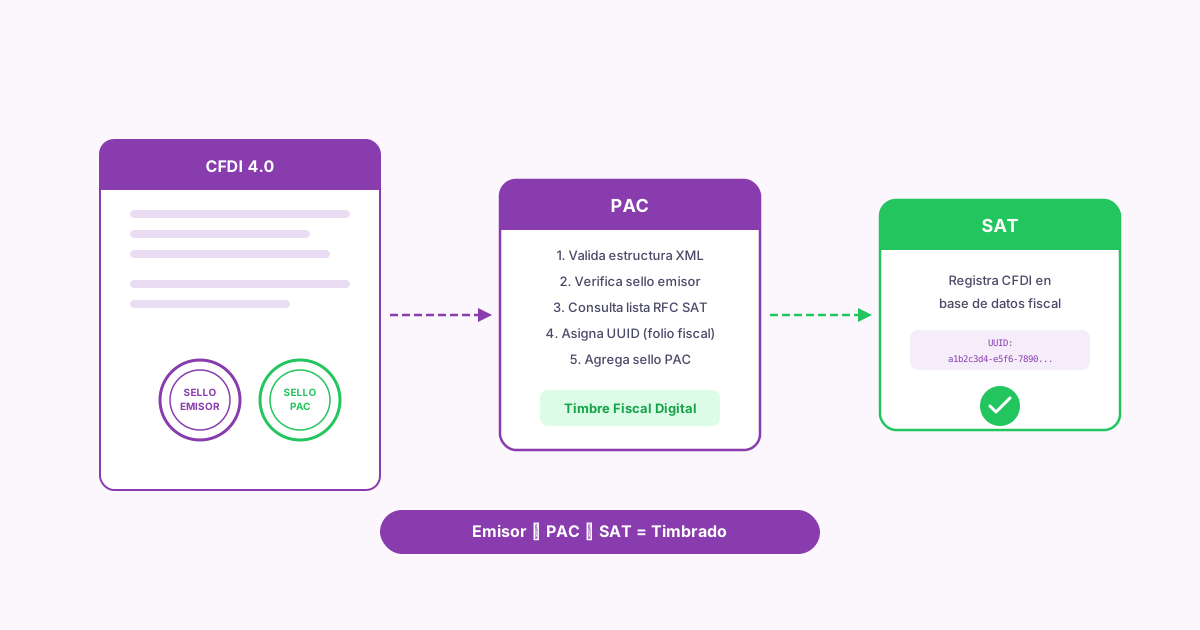
Stamping involves three actors: the issuer (you or your system), the PAC, and the SAT. Each one has a specific role, and understanding the sequence saves you hours of debugging when something fails.
What this diagram doesn't show is everything that happens inside the PAC's validation. The PAC does more than check that the XML is well formed. It checks the SAT's lists of active RFCs (Mexico's taxpayer IDs, Registro Federal de Contribuyentes) and confirms that your CSD hasn't been revoked. It checks that the issuer's and recipient's tax regime (régimen fiscal, the SAT category a taxpayer is registered under, such as 601 or 626) is a valid key for that type of taxpayer. And it verifies that every code exists in the current SAT catalogs: the CFDI use (how the recipient will use the CFDI for tax purposes), the form of payment (how the customer paid: cash, bank transfer, card; the FormaPago key), and the SAT product or service key.
The issuer builds the XML and seals it with its CSD#
Your system builds the CFDI XML with all the tax data: issuer, recipient, line items, taxes, currency, and payment method (whether the CFDI is paid in full when issued, PUE, or later or in installments, PPD; not how the customer pays). Then it applies the CSD to sign the CFDI. This signature is cryptographic and guarantees that the content wasn't altered after it was issued. Without the CSD, the PAC rejects the XML immediately.
The PAC receives the XML and validates it#
The PAC runs dozens of validations. It checks the XML structure against the SAT's XSD schema, confirms that the issuer's RFC is active in the LCO (Lista de Contribuyentes Obligados, the SAT's list of taxpayers' seal certificates and their status, which only PACs can query), validates that the CSD hasn't been revoked, and checks that every field meets the validation rules of Anexo 20 (the SAT technical standard that defines the CFDI: its XML structure, catalogs, and validation rules). If any validation fails, the PAC returns a specific error code and the stamping doesn't go through.
The PAC generates the digital tax stamp and returns the stamped XML#
The PAC generates the TimbreFiscalDigital (TFD) node, which contains the CFDI's UUID, the stamp date, the SAT seal (the seal inside the digital tax stamp that certifies the CFDI), the issuer's digital seal (the issuer's signature over the CFDI, made with its CSD), and the PAC's certificate number. This node is added to the original XML. The result is the stamped CFDI you deliver to your customer.
The PAC sends the CFDI to the SAT#
Once the CFDI is stamped, the PAC sends a copy to the SAT, which records it in its database. From then on, the CFDI exists in the SAT's system and can be looked up with its UUID.
What the digital tax stamp contains
The digital tax stamp is the XML node the PAC adds to your CFDI after validating it. It holds the cryptographic evidence that the CFDI was reviewed and registered.
The folio fiscal. It's a 36-character universally unique identifier in hexadecimal with hyphens (for example, 6F8A4C12-3B7E-4D9A-A1F0-8C2E5D7B9F03). It never repeats. It's your invoice's definitive identifier with the SAT. You need it to cancel, check the status, link payment complements (the complement that records each payment received against a PPD invoice; the type P CFDI that carries it is also called REP), or answer requests from the SAT.
The CSD: the key to stamping
You can't stamp invoices without a current CSD. The CSD is a pair of files the SAT issues to you: a certificate (.cer) and a private key (.key), protected by a password. Together they make up your digital identity for invoicing.
What the CSD does
It digitally signs every CFDI you issue. The PAC verifies that signature before stamping. If the CSD is expired, revoked, or doesn't belong to the issuer's RFC, the stamping fails. A CSD is valid for 4 years, but the SAT can revoke it earlier if it detects tax irregularities.
CSD vs e.firma
They use the same technology, but they're different things. The e.firma (the SAT advanced electronic signature that identifies a taxpayer, formerly FIEL) is your general identity with the SAT: you use it for tax returns, procedures, and the tax mailbox (Buzón Tributario). The CSD is specific to stamping CFDIs. You can have several active CSDs (one per branch, for example), but only one e.firma. You need an active e.firma to request your CSD.
If the SAT revokes your CSD, you can't stamp invoices until you get a new one. Revocation can happen because of tax irregularities, inconsistent tax returns, or being on the Lista 69-B (the SAT list of taxpayers presumed to issue invoices for nonexistent transactions, under Article 69-B of the Federal Tax Code). Check your CSD's status regularly.
Common CFDI stamping errors
After debugging hundreds of PAC integrations, I can tell you that stamping errors repeat with remarkable consistency. These are the ones you'll run into in production.
To diagnose stamping errors, always look at the error code the PAC returns. The SAT standardizes the codes, and each one points to a specific field or rule. A good log that captures the error code, the message, and the XML you tried to stamp saves you hours of debugging.
CFDI stamping with Fiscalapi
Built from scratch, the flow has dozens of failure points: building the XML, signing it with the CSD, sending it to the PAC, parsing the response, and handling errors. Fiscalapi wraps all of it in a single call to its CFDI API. You send the business data (who sells, who buys, what was sold, what it cost), and Fiscalapi builds the XML, signs it, stamps it through an authorized PAC, and returns the stamped CFDI with its UUID.
With the Fiscalapi SDKs, available for .NET, Node.js, Python, PHP, and Java, stamping comes down to one call: you send the invoice data and get back the stamped CFDI with its UUID and XML. The integration examples on GitHub show the full flow working.
Fiscalapi takes that data, builds the complete XML with every node the SAT requires, signs it with your CSD (which you upload once, when you set up Fiscalapi), sends it to the PAC, and returns the stamped CFDI. The UUID and the stamped XML come back in the response, and the API generates the PDF from the invoice ID.
The test environment at test.fiscalapi.com runs the stamping flow, including stamping validations, with no tax consequences. You can stamp, cancel, and stamp again as many times as you need while you build your integration. When you're ready for production, you change the URL and the credentials.
The full API documentation covers everything from the initial setup to advanced scenarios such as stamping payment complements, credit notes (Egreso CFDIs, type E), and CFDIs with Carta Porte (the CFDI complement that documents the transport of goods in Mexico).
How to verify that an invoice was stamped
After stamping, it's a good idea to verify that the CFDI was correctly registered with the SAT. There are two ways to do it.
Verification on the SAT portal
The SAT offers a CFDI verifier where you enter the UUID, the issuer's RFC, and the recipient's RFC. If the CFDI exists and is active (vigente: not canceled with the SAT), the portal confirms it. This check is useful for manual verification or when a customer questions whether an invoice is valid.
Canceling stamped invoices
Stamping an invoice doesn't make it permanent. The SAT allows CFDIs to be canceled, but the process has rules that changed significantly in 2022.
For invoices over $1,000 MXN, you need the recipient to accept the cancellation. When you request the cancellation, the SAT notifies the recipient through their tax mailbox. The recipient has 3 business days to accept or reject it. If they don't respond, the cancellation is accepted by default. This flow applies whatever the cancellation reason (one of the SAT keys 01 to 04), including reason 01 (Comprobante emitido con errores con relación, issued with errors, replaced by a related CFDI).
You can cancel a CFDI no later than the month in which the annual ISR (Mexico's income tax, Impuesto Sobre la Renta) return is due for the fiscal year in which you issued it, under Article 29-A of the Código Fiscal de la Federación (Mexico's Federal Tax Code). After that deadline, cancellation gets complicated and may require an amended return. Don't leave cancellations pending.
High-volume stamping: architecture considerations
When you process thousands of invoices a day, stamping stops being an HTTP call and becomes an architecture problem. The PAC's response times vary (between 500 ms and 3 seconds, depending on the SAT's load), and your system needs to handle retries, timeouts, and idempotency.
Use message queues to decouple invoice generation from stamping#
Don't stamp synchronously inside the business transaction. Generate the invoice data, put it in a queue (RabbitMQ, SQS, Azure Service Bus), and let a dedicated worker handle the stamping. That way your sales flow doesn't depend on the PAC's response time.
Implement idempotency with unique keys#
If a timeout leaves you not knowing whether the PAC stamped or not, you need to be able to retry without creating a duplicate CFDI. Use a unique identifier per invoice (your internal sale ID, for example) and check whether a stamped CFDI already exists for that identifier before you retry.
Monitor response times and error rates#
PACs go down. The SAT has maintenance windows. If your error rate climbs above 5%, something is going on and you need to know before thousands of unstamped invoices pile up. Set up alerts based on metrics, not on user complaints.
Consider a secondary PAC as a fallback#
If your volume justifies it, set up a second PAC. When the primary one fails or its latency degrades, your system routes to the secondary.
Frequently asked questions about CFDI stamping
Recap
Strip away the red tape and the mystique, and CFDI stamping is a cryptographic protocol that guarantees the authenticity and integrity of every tax transaction in Mexico. Your system generates the XML and signs it with the CSD, the PAC validates it against the SAT's rules, seals it with the digital tax stamp, and returns a CFDI with full legal validity. The most common errors are predictable and preventable: expired CSDs, recipient data that doesn't match, and invalid catalog combinations.
If you're building an invoicing integration, don't reinvent stamping from scratch. Use an API like Fiscalapi that has already solved validation, signing, communication with the PAC, and error handling. Your time is better spent on your application's business logic than on parsing the SAT's XSDs.