

Global invoice (factura global) in CFDI 4.0
April 6, 2026
Say your business sells to the general public (customers who did not ask for their own CFDI): a store, a restaurant, or a doctor's office that sometimes sees patients without an RFC (Mexico's taxpayer ID, Registro Federal de Contribuyentes). If you don't issue an individual invoice for each sale, the SAT (Mexico's tax authority, Servicio de Administración Tributaria) needs you to consolidate those transactions in a single document. That document is the CFDI global invoice (CFDI: Mexico's electronic invoice; global invoice: factura global, one CFDI that groups a period's sales to the general public). It isn't optional. And the rules on periodicity, required fields, and issuance deadlines are stricter than most people assume.
What is a CFDI global invoice
A CFDI global invoice groups, in a single document, all the sales you made to the general public during a given period. Instead of issuing one invoice for each transaction where the customer didn't give you their RFC, you issue one CFDI that consolidates the amounts.
The SAT defines it in Rule 2.7.1.21 of the Resolución Miscelánea Fiscal (RMF, the SAT's annual tax rules). Its purpose is twofold: making sure taxpayers report 100% of their income, and making invoicing simpler when there's a high volume of small sales without the buyer's tax details.
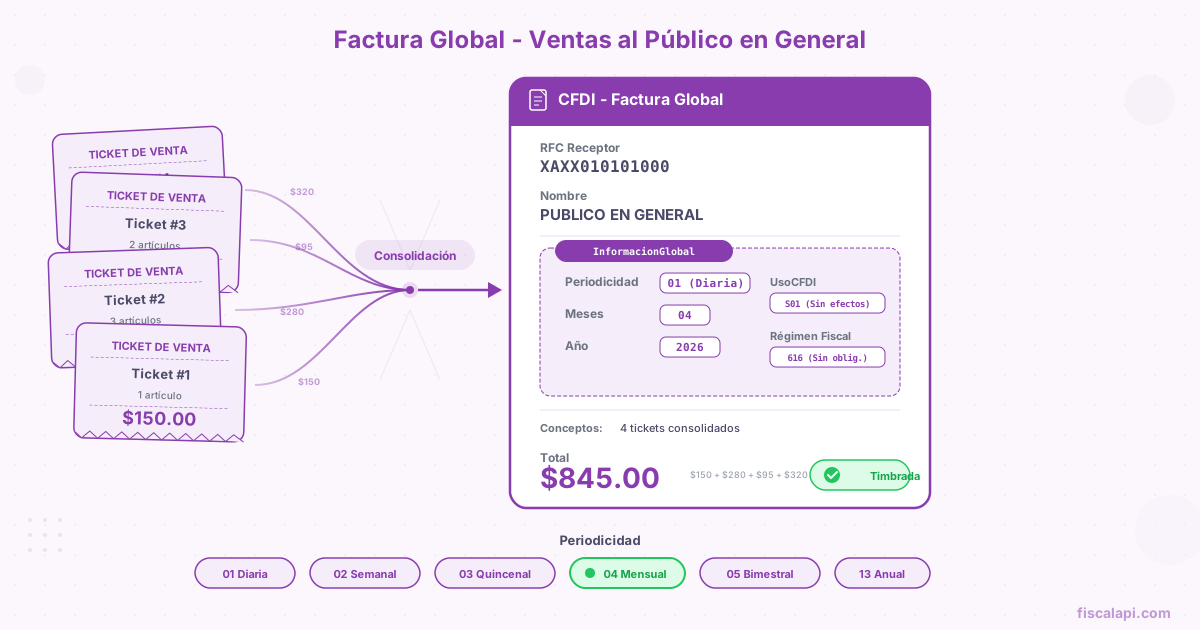
In the structure of CFDI 4.0, the global invoice stands out in three ways: it uses the generic RFC XAXX010101000 as the recipient, it includes the InformacionGlobal node that regular invoices don't have, and its CFDI use (how the recipient will use the CFDI for tax purposes) is always S01 (Sin efectos fiscales, no tax effect).
A global invoice is a full income CFDI (type I, the regular sales invoice) with every standard SAT validation, plus the validations of the InformacionGlobal node. Don't think of it as a "simplified" invoice or a sales note with a tax seal. If any required field is missing, the PAC (Proveedor Autorizado de Certificación, a SAT-authorized provider that stamps CFDIs) rejects it like any other invoice.
Who must issue a global invoice
Any individual (persona física) or legal entity (persona moral) that sells to the general public and doesn't issue an individual CFDI for each transaction has to issue a CFDI global invoice. Your tax regime (régimen fiscal, the SAT category a taxpayer is registered under, such as 601 or 626) and your line of business don't matter.
In practice, this includes:
- Retailers (grocery, clothing, and electronics stores)
- Restaurants and coffee shops
- Doctor's offices and professionals who serve customers without an RFC
- Businesses with a physical point of sale that hand out sales receipts
If every sale you make gets an individual CFDI, you don't need a global invoice. But if there's even one sale where the customer didn't ask for an invoice, that sale has to go into the global invoice for its period.
Skipping the global invoice for your sales to the general public doesn't mean the SAT won't find out about that income. If you take payments through a bank card terminal, the SAT cross-references the deposits with the CFDIs you issued. The differences lead to letters from the SAT inviting you to correct your situation or, worse, to direct audits.
The generic RFC XAXX010101000
The recipient of a global invoice is always the generic RFC XAXX010101000. It's a value the SAT reserves to represent the "general public," and it doesn't belong to any real taxpayer. If you want the full picture on generic RFCs and when to use each one, I wrote a dedicated guide: generic RFCs and their variants.
The recipient data on a global invoice is fixed, no exceptions:
| Field | Value | Notes |
|---|---|---|
| Rfc | XAXX010101000 | Generic RFC for transactions with the general public |
| Nombre | PUBLICO EN GENERAL | Exactly like this: uppercase, no accents |
| RegimenFiscalReceptor | 616 | Sin obligaciones fiscales (no tax obligations) |
| DomicilioFiscalReceptor | The issuer's postal code | Must match LugarExpedicion |
| UsoCFDI | S01 | Sin efectos fiscales (no tax effect), the only key the global invoice guide allows |
The name must be exactly PUBLICO EN GENERAL. Not Publico en General, not PÚBLICO EN GENERAL with an accent, not PUBLICO GENERAL. The SAT's global invoice guide requires that exact string, and the PAC uses it to require the InformacionGlobal node. Don't count on stamping (the certification by a SAT-authorized provider that makes a CFDI valid) to catch a misspelled variant: get the literal right in your code.
The DomicilioFiscalReceptor field on a global invoice must be the same postal code as the LugarExpedicion of the CFDI. It's a SAT validation rule for the generic RFC XAXX010101000 (XEXX010101000 follows it too). On regular invoices, the recipient's tax address (the address registered with the SAT; a CFDI 4.0 carries only its postal code) doesn't depend on the place of issue (the postal code where the CFDI is issued).
The InformacionGlobal node
This is the node that makes a global invoice global. If your income CFDI goes to XAXX010101000 with the name PUBLICO EN GENERAL and doesn't have it, the PAC rejects it. The InformacionGlobal node goes at the level of the Comprobante node and holds three required attributes.
| Attribute | Type | Description |
|---|---|---|
| Periodicidad | Catalog | How often the sales are grouped |
| Meses | Catalog | Month or months the CFDI covers |
| Año | Numeric | Tax year of the period (4 digits) |
All three attributes are required. Leaving out any of them gets an immediate rejection from the PAC. And the values aren't free text: Periodicidad and Meses come from closed catalogs that the SAT validates, and Año must be the year of the CFDI's Fecha or one of the five years before it.
Periodicity: the rules of the game
Periodicity defines how often you group your sales to the general public into a global invoice. The SAT offers five options, and the one you choose has to match the real period of your transactions.
| Code | Periodicity | Issuance deadline |
|---|---|---|
01 | Daily | Within 24 hours after the day closes |
02 | Weekly | Within 24 hours after the week closes |
03 | Semi-monthly | Within 24 hours after the half-month closes |
04 | Monthly | Within 24 hours after the month closes |
05 | Bimonthly (every two months) | Within 24 hours after the two-month period closes |
Bimonthly periodicity (05) is reserved for taxpayers under the RIF (Régimen de Incorporación Fiscal, a small-taxpayer regime closed to new taxpayers since 2022), tax regime 621. It isn't for RESICO (Régimen Simplificado de Confianza, Mexico's simplified tax regime for small taxpayers), regime 626. If your regime isn't 621 and you use bimonthly periodicity, the PAC rejects the CFDI.
Periodicity isn't a preference. The SAT expects it to match how your business operates. If you sell every day and choose monthly periodicity, you technically comply. But if you handle high volume and a customer asks for an individual invoice for a sale from the 3rd, you already have a cancellation problem. The operational recommendation: the more frequent, the more manageable.
Month and two-month period codes
The Meses attribute of the InformacionGlobal node uses a numeric catalog. For monthly or shorter periodicity, you use codes 01 to 12. For bimonthly periodicity, you use codes 13 to 18.
| Code | Period |
|---|---|
01 | Enero (January) |
02 | Febrero (February) |
03 | Marzo (March) |
04 | Abril (April) |
05 | Mayo (May) |
06 | Junio (June) |
07 | Julio (July) |
08 | Agosto (August) |
09 | Septiembre (September) |
10 | Octubre (October) |
11 | Noviembre (November) |
12 | Diciembre (December) |
13 | Enero-Febrero (January-February) |
14 | Marzo-Abril (March-April) |
15 | Mayo-Junio (May-June) |
16 | Julio-Agosto (July-August) |
17 | Septiembre-Octubre (September-October) |
18 | Noviembre-Diciembre (November-December) |
The periodicity and the month have to be consistent. If the periodicity is 04 (monthly), the Meses attribute can only take a value from 01 to 12. If it's 05 (bimonthly), only 13 to 18. If it's 01 (daily), the month must be the month in which the sale took place. Mixing bimonthly periodicity with a single-month code gets the CFDI rejected.
How to issue a CFDI global invoice to the general public, step by step
Gather every transaction of the period where the customer didn't ask for an individual CFDI. If you hand out sales receipts, every receipt without an individual invoice tied to it goes into the global invoice. The amounts have to match your accounting records and your cash register closeouts.
Build the CFDI with the fixed recipient data#
Create an income CFDI (I) with the recipient data you already saw: RFC XAXX010101000, name PUBLICO EN GENERAL, tax regime 616, CFDI use S01. The payment method (whether the CFDI is paid in full when issued, PUE, or later or in installments, PPD; not how the customer pays) must be PUE. The form of payment (how the customer paid: cash, bank transfer, card; the FormaPago key) is the one used to pay the largest sales receipt in the global invoice. If two receipts tie for the largest amount with different forms of payment, you can choose either one.
Add the InformacionGlobal node#
Include the periodicity that matches your operation, the right month code, and the tax year. This node goes at the level of the Comprobante node, not inside the line items or the recipient.
Add one line item per sales receipt, with its taxes#
Each line item represents one sales receipt: ClaveProdServ 01010101, the receipt's number or transaction number in NoIdentificacion, Cantidad 1, and ClaveUnidad ACT. Unless you're an individual under RESICO or the RIF (see the last section), you can't put a single generic line with the period's total. If a receipt mixes IVA (Mexico's value-added tax, VAT) rates, split it into one line item per rate, each with the receipt's number. The IVA has to be broken down: the global invoice is no exception to the CFDI 4.0 tax rules.
Send the XML for stamping like any other CFDI. The PAC validates every standard field plus the InformacionGlobal rules. If everything is correct, you get your UUID (folio fiscal, the unique ID the PAC assigns when it stamps a CFDI) and the CFDI is registered with the SAT.
When the customer asks for an individual invoice later
This is the scenario that causes the most trouble. A customer bought something, didn't ask for an invoice at the time, the sale already went into your global invoice for the period, and now they want their individual CFDI. You have to do two things: issue the individual invoice and take that sale out of the global invoice.
The correct process is:
- Issue the individual CFDI to the customer with their real tax details
- Cancel the original global invoice with cancellation reason (one of the SAT keys
01to04)04, the one that cancels a global invoice that included a sale the customer now wants invoiced in their own name - Issue a new global invoice without the amount of the sale you already invoiced individually
Cancellation reason 04 is the one built for this scenario. Don't use 01 (issued with errors, replaced by a related CFDI) or 02 (issued with errors, no replacement CFDI). Reason 04 tells the SAT that you're canceling because the transactions in the original CFDI were invoiced individually.
This explains why periodicity matters operationally. If your global invoice is monthly and groups thousands of transactions, canceling and reissuing it for a single sale is a pain. With daily or weekly periodicity, the impact of the cancellation is much smaller.
Taxes on a global invoice
A global invoice follows the same tax rules as any income CFDI. No shortcuts, no simplifications.
Transferred IVA
Each line item has to state that it's subject to tax, with its tax object (whether an item is subject to tax, ObjetoImp) set to 02, and break down its transferred tax (traslado, a tax the issuer charges the recipient). If you sell products at the 0% rate and products at the 16% rate, each rate needs its own line item. The taxes node at the line item level and at the CFDI level have to add up.
IEPS and other taxes
If you sell products subject to IEPS (Mexico's excise tax on specific goods and services, Impuesto Especial sobre Producción y Servicios), such as alcoholic beverages, soft drinks, or tobacco, the IEPS is also broken down per line item. The IEPS rules apply the same as on any income invoice: the global invoice doesn't exempt you from breaking down special taxes.
A common mistake is lumping everything into a single line item and computing one IVA on the total. Outside the RESICO and RIF cases, that breaks the rule that each sales receipt is its own line item, with its own tax breakdown. The PAC may stamp it if the XML structure is valid, but the SAT can object to it in a review.
Common mistakes when issuing a global invoice
Issuance deadlines and consequences
The deadline doesn't change with the periodicity: Rule 2.7.1.21 of the RMF and the SAT's global invoice guide give you up to 24 hours after the period closes to send it for stamping, whether the period is a day, a week, half a month, a month, or two months.
| Periodicity | Example period | Issuance deadline |
|---|---|---|
| Daily | Monday, April 6, 2026 | Tuesday, April 7, 2026, 11:59 p.m. |
| Weekly | Week of April 6 to 12, 2026 | Monday, April 13, 2026, 11:59 p.m. |
| Semi-monthly | April 1 to 15, 2026 | Thursday, April 16, 2026, 11:59 p.m. |
| Monthly | April 2026 | Friday, May 1, 2026, 11:59 p.m. |
| Bimonthly | March-April 2026 | Friday, May 1, 2026, 11:59 p.m. |
Missing the deadline doesn't mean you can no longer issue the global invoice. You can issue it later, but you're past the deadline, and that can lead to fines or requests from the SAT. In practice, many businesses stamp the global invoice in the last hours of the window. It works, but it leaves zero margin for error if something fails at stamping.
If you automate global invoices with an e-invoicing API, schedule the generation for right after the period closes, not for the end of the 24-hour window. That gives you time to catch stamping errors, fix them, and retry without missing the deadline. Fiscalapi stamps the global invoice through its PAC with the request your system sends to the API, like any other CFDI. If you record your sales as tickets (sales receipts your customers can later turn into CFDIs) with Auto CFDI invoicing, each line item carries the ID of its ticket and Fiscalapi marks those tickets as invoiced. See the global invoice documentation for the integration details.
Bimonthly global invoices and the RIF
Taxpayers under the RIF have one particularity: they can issue the global invoice with bimonthly periodicity (05). That cuts the number of global invoices from 12 to 6 a year. RESICO taxpayers can't: the PAC accepts 05 only when the issuer's regime is 621. Rule 2.7.1.21 of the RMF does set one difference for individuals under both regimes: their global invoice includes only the total amount of the period's sales, not one line item per sales receipt.
But there's a catch. The RIF has been closed to new taxpayers since 2022. If you left the RIF and keep issuing global invoices with bimonthly periodicity, you're using a periodicity that no longer applies to you, and the PAC rejects it. Your system has to detect regime changes and adjust the periodicity automatically.
The month codes for bimonthly RIF global invoices go from 13 to 18, covering each pair of months in the year. These codes are exclusive to bimonthly periodicity, and the PAC rejects them if you use them with any other periodicity.