

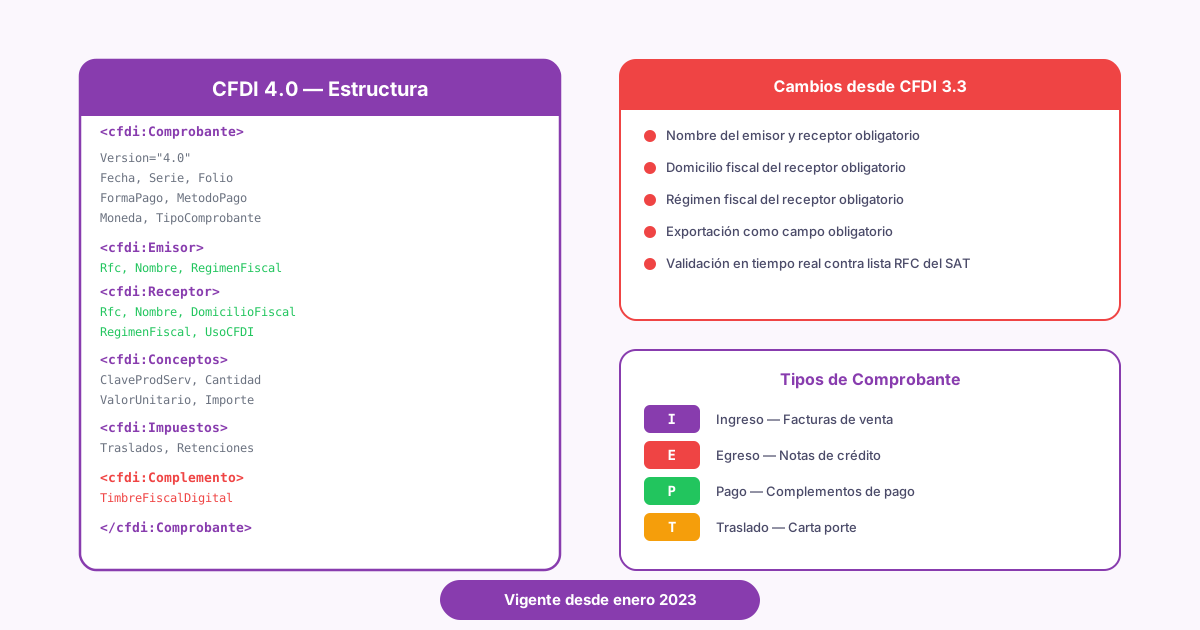
CFDI 4.0: a technical guide for developers
April 4, 2026
Since 2023, CFDI 4.0 (Mexico's electronic invoice) has been the only version of the CFDI that the SAT (Mexico's tax authority, Servicio de Administración Tributaria) accepts. Any other version fails stamping (the certification by a SAT-authorized provider that makes a CFDI valid). If you've been integrating invoicing systems for a while, you'll remember the chaos of the migration from version 3.3. New fields, stricter validations, and a recipient that suddenly needed data nobody was collecting. Three years later, I still run into integrations that drag migration patches around like inherited technical debt.
If you're building anything that touches e-invoicing in Mexico, you need to understand CFDI 4.0 at the level of fields, validations, and flows. Forget "which button do I press in the SAT portal". The question that matters is "which fields does my API send to the PAC (Proveedor Autorizado de Certificación, a SAT-authorized provider that stamps CFDIs), and why does it reject them". That's what this guide covers.
What is CFDI 4.0
CFDI stands for Comprobante Fiscal Digital por Internet. It's an electronic document in XML format that records business transactions and is valid for tax purposes in Mexico. Every CFDI carries the issuer's digital signature and a digital tax stamp (Timbre Fiscal Digital, the SAT seal the PAC adds to a CFDI).
CFDI 4.0 is the fourth major version of this standard, published by the SAT in 2022 and mandatory since April 1, 2023, after a transition period in which version 3.3 was still accepted. It fully replaced version 3.3, which had been in force since 2017. If you want the CFDI fundamentals from scratch, I have a guide that covers them: what CFDI is and how it works.
The core difference between CFDI 4.0 and its predecessor goes well beyond a version number. The SAT decided it wanted to know more about the recipient of each invoice, tightened the validation of tax data, and changed the cancellation rules so you couldn't delete invoices without the other party finding out. In practice, the XML went from a fairly flexible format to one where an extra period, comma, or space makes the PAC reject the stamping.
CFDI 4.0 changes from version 3.3
Before going field by field, it's worth looking at the big picture of CFDI 3.3 vs 4.0. If you migrated from 3.3, this table will look familiar. If you're starting directly with 4.0, it explains why certain fields exist and why they're so strict.
| Aspect | CFDI 3.3 | CFDI 4.0 |
|---|---|---|
| Recipient name | Optional (you could omit it or enter any text) | Required, and it must match the Constancia de Situación Fiscal (the SAT tax status certificate) exactly |
| Recipient's tax address (the address registered with the SAT; a CFDI 4.0 carries only its postal code) | Not required | Required (postal code registered with the SAT) |
Recipient's tax regime (régimen fiscal, the SAT category a taxpayer is registered under, such as 601 or 626) | Not required | Required and validated against the SAT catalog |
| Export field | Didn't exist | Required on every CFDI (01 if it doesn't apply) |
| Cancellation | Unrestricted, no approval from the recipient | Requires the recipient's acceptance after the next business day following issuance (except amounts of $1,000.00 MXN or less) |
| Cancellation reason | Not required | Required, with a specific key (01, 02, 03, 04) |
Replacement CFDI (CFDI replacement: you issue a corrected CFDI related to the original with relationship type 04, then cancel the original with reason 01) | Optional when canceling | Required when the cancellation reason is 01 (Comprobante emitido con errores con relación, issued with errors, replaced by a related CFDI) |
| Validation of the RFC (Mexico's taxpayer ID, Registro Federal de Contribuyentes) | Basic | The PAC validates it against the SAT's list of active RFCs (LRFC) |
Payment complement (the complement that records each payment received against a PPD invoice; the type P CFDI that carries it is also called REP) | Version 1.0 | Version 2.0, with a required tax breakdown |
The cancellation rows compare the rules before and after 2022, not the two versions. Those rules took effect alongside the move to 4.0, and the SAT applies them to every CFDI version, 3.3 included: the cancellation reason has been required for all versions since January 1, 2022.
What hurt the most in production was the recipient name. It looks trivial, but "EMPRESA SA DE CV" and "EMPRESA, S.A. DE C.V." aren't the same thing for stamping. Thousands of integrations broke over something that, at the code level, is a string comparison.
If you maintain a system that migrated from 3.3 to 4.0 in 2022-2023, check your stamping error logs. It's common to find patches that fill the new fields with default values without validating them against the recipient's real data. That passes audits... until it doesn't.
CFDI 4.0 structure
A CFDI 4.0 is an XML file with a hierarchical structure defined by the SAT. It has dozens of fields, but these are the main nodes and their most relevant fields.
| Node | Field | Required | Description |
|---|---|---|---|
| Comprobante | Version | Yes | Always 4.0 |
Serie | No | Series identifier (e.g., F, NC) | |
Folio | No | Sequential number within the series | |
Fecha | Yes | Issue date and time in ISO 8601 format | |
FormaPago | Conditional | Form of payment (how the customer paid: cash, bank transfer, card; the FormaPago key): 03, 01, 99, etc. | |
MetodoPago | Conditional | PUE (paid in full when the CFDI is issued, Pago en una sola exhibición) or PPD (paid in installments or later, Pago en parcialidades o diferido) | |
TipoDeComprobante | Yes | I, E, T, P, N | |
Exportacion | Yes | 01 not applicable, 02 definitive with key A1, 03 temporary, 04 definitive with another key or without a sale | |
LugarExpedicion | Yes | Issuer's postal code | |
Moneda | Yes | ISO 4217 code (MXN, USD, etc.) | |
| Emisor | Rfc | Yes | Issuer's RFC |
Nombre | Yes | Exact name or legal name (as registered with the SAT) | |
RegimenFiscal | Yes | Tax regime key (601, 612, etc.) | |
| Receptor | Rfc | Yes | Recipient's RFC |
Nombre | Yes | Exact name or legal name (validated against the SAT) | |
DomicilioFiscalReceptor | Yes | Postal code of the tax address | |
RegimenFiscalReceptor | Yes | Recipient's tax regime | |
UsoCFDI | Yes | CFDI use (how the recipient will use the CFDI for tax purposes): G03, G01, S01, etc. | |
| Concepto | ClaveProdServ | Yes | SAT product or service key, from the SAT product catalog |
ClaveUnidad | Yes | Unit of measure key | |
Cantidad | Yes | Quantity of the product or service | |
Descripcion | Yes | Free-text description of the line item | |
ValorUnitario | Yes | Unit price before taxes | |
Importe | Yes | Quantity x unit price | |
ObjetoImp | Yes | 01 not subject to tax, 02 subject to tax, 03 subject to tax but not required to itemize it | |
| Impuestos | TotalImpuestosTrasladados | Conditional | Sum of transferred taxes (traslado, a tax the issuer charges the recipient) |
TotalImpuestosRetenidos | Conditional | Sum of withheld taxes (withholding: retención) |
The ObjetoImp field (tax object: whether an item is subject to tax) is one of the fields that arrived with CFDI 4.0, and it causes silent errors. If a line item has transferred or withheld taxes, it must be 02. If it has no taxes, it must be 01. An exempt item isn't in that group: it still carries a transferred tax with factor type Exento (exempt), so it's 02. Setting 02 without including tax nodes in that line item makes the PAC reject it.
CFDI 4.0 types
Every CFDI has a CFDI type (the TipoDeComprobante key: I income, the regular sales invoice; E credit note; T transfer, moves goods without a sale; N payroll; P payment), set in the TipoDeComprobante field. Each type has its own rules about which fields are required and which don't apply.
The sales document. You issue it when you charge for a product or service. It's what everyone calls an "invoice", although technically it's an income CFDI. It requires a form of payment, a payment method (whether the CFDI is paid in full when issued, PUE, or later or in installments, PPD; not how the customer pays), line items with taxes, and all the recipient's data.
If your system issues only one type of CFDI, it's this one. 90% of the integrations I've seen handle income CFDIs exclusively and leave the rest to accounting.
Specific required fields: FormaPago, MetodoPago, Conceptos with a tax breakdown, and the recipient's full data. The Spanish-language CFDI use guide covers which use applies in each case.
Required fields in detail: issuer, recipient, and line items
These three nodes account for 80% of the stamping errors I've seen in production. They aren't hard. They need data that isn't always available at the moment you invoice.
The Emisor node carries your RFC, your name or legal name, and your tax regime. All three must match what the SAT has on record. If you changed tax regime and didn't update your system, the PAC rejects the stamping without a particularly useful explanation.
The issuer name must be exactly as it appears on your Constancia de Situación Fiscal. Uppercase, accents, periods, commas. Everything counts. Store that string as a configuration value, not as something a user can edit freely.
Recipient: your customer's data#
This is where CFDI 4.0 raised the bar. You need: RFC, exact name (the same as on their Constancia de Situación Fiscal), the postal code of their tax address, tax regime, and CFDI use.
If you sell to the general public (customers who did not ask for their own CFDI), you use the generic RFC XAXX010101000, regime 616 (Sin Obligaciones Fiscales, no tax obligations), and CFDI use S01 (Sin Efectos Fiscales, no tax effect). For foreign customers, the RFC is XEXX010101000.
The practical recommendation: ask each customer for their Constancia de Situación Fiscal the first time and store that data. Don't ask them "what's your RFC and name". Have them send you the SAT PDF and enter the data yourself. You avoid 90% of rejections.
Each line item needs a SAT product key (ClaveProdServ), a unit key (ClaveUnidad), quantity, description, unit price, and the ObjetoImp field. If the line item is subject to tax (02), it must include transferred and/or withheld tax nodes.
The SAT product key is a catalog with more than 50,000 entries. For software, the most common one is 81112500 (software services). For professional services, 80101500. The SAT publishes the full catalog at sat.gob.mx.
On taxes: IVA (Mexico's value-added tax, VAT) at 16% is a transferred tax with base Importe, tax 002 (IVA), factor type Tasa (rate), and rate 0.160000. If you withhold ISR (Mexico's income tax, Impuesto Sobre la Renta) at 10%, it's a withheld tax with tax 001 (ISR), factor type Tasa, and rate 0.100000. Rates take 6 decimal places.
The form of payment, FormaPago, says how you were paid: 01 cash, 03 bank transfer, 04 credit card. The payment method (MetodoPago) says when: PUE if you've already been paid, PPD if you'll be paid later. Form of payment 99 is valid only with PPD. If you use any other form of payment with PPD, the PAC rejects it (CFDI40105). 99 with PUE gets stamped, but it goes against the SAT's filling guide: if you've already been paid, record the real form of payment.
CFDI 4.0 life cycle
A CFDI isn't something you create and forget. It has a life cycle that runs from creation to cancellation, and each stage has its own rules and deadlines.
The most significant change to the life cycle in the CFDI 4.0 era was cancellation. You can no longer cancel unilaterally after the next business day following issuance. The recipient has to approve the cancellation, and if they don't respond within three business days, it's approved automatically. The exceptions include CFDIs for amounts of $1,000.00 MXN or less, payroll CFDIs (the CFDIs issued for each salary payment, type N), credit notes (Egreso CFDIs, type E), and transfer CFDIs.
On top of that, every cancellation needs a reason:
01Comprobante emitido con errores con relación (issued with errors, replaced by a related CFDI): you must include the UUID (folio fiscal, the unique ID the PAC assigns when it stamps a CFDI) of the CFDI that replaces it02Comprobante emitido con errores sin relación (issued with errors, no replacement CFDI)03No se llevó a cabo la operación (the transaction did not take place)04Operación nominativa relacionada en una factura global (cancels a global invoice that included a sale the customer now wants invoiced in their own name)
Stamping invoices in a test environment lets you test the whole life cycle, cancellations included, with no tax consequences. Always test your cancellation flows before going to production. The most expensive mistake is finding out your cancellation logic doesn't work when you already have a real CFDI you need to void.
Complements available for CFDI 4.0
Complements are additional XML nodes inserted inside the CFDI for specific cases. Each complement has its own XSD schema and version.
Payment complement 2.0
Records payments received for invoices issued with the PPD method. It must include a proportional tax breakdown for each related document. Current version: 2.0, in force since January 2022.
Carta Porte 3.1
Carta Porte (the CFDI complement that documents the transport of goods in Mexico) is required for moving goods on federal highways. It includes origin, destination, goods, mode of transport, and operator details. It applies to income and transfer CFDIs.
Payroll 1.2
Details earnings (percepciones: salary, overtime, bonuses, and other pay), deductions, overtime, work incapacities, and the employee's data. It goes inside payroll CFDIs. Its version didn't change with CFDI 4.0, but the PAC validations got stricter.
Comercio Exterior 2.0
Comercio Exterior (the CFDI foreign trade complement for exports) is for definitive exports of goods. It includes the foreign consignee's data, goods with their fracción arancelaria (Mexico's 8-digit tariff code: the 6-digit Harmonized System code plus 2 Mexican digits), and the customs value. It's required when the Exportacion field is 02, optional with 04, and not allowed with 03.
INE 1.1
For reporting contributions to and expenses of election campaigns. Niche, but required for political parties and election service providers.
Leyendas Fiscales 1.0
Lets you add the mandatory text that certain tax provisions require. For example, legends for transactions with the general public or for certain special regimes.
How to issue a CFDI 4.0 with the Fiscalapi API
Building a CFDI 4.0 XML by hand is a recipe for pain. Dozens of fields with cross-validations, catalogs with thousands of keys, and an XSD schema that doesn't forgive an attribute out of order. The practical route is an API that builds the XML, validates it, sends it to the PAC, and returns the stamped CFDI ready to deliver.
With Fiscalapi, issuing a CFDI 4.0 comes down to one API call with the transaction data. Fiscalapi handles the rest: it builds the XML, validates it against the SAT catalogs, stamps it, and returns the invoice's UUID. See the API documentation for every available field and for the cancellation, query, and PDF/XML download endpoints.
Fiscalapi handles stamping, PDF generation, and XML storage. In the test environment (test.fiscalapi.com) you can stamp at no cost and with no tax consequences. The test environment runs stamping validations, including the checks on the recipient's RFC, tax regime, and name. The full API documentation covers every endpoint.
What sets this approach apart is that you don't need to know the internal structure of the XML. Fiscalapi maps the API fields to the CFDI 4.0 nodes, calculates taxes, validates catalogs, and handles complements automatically. You take care of the business logic; the API takes care of the SAT. If you want to see what that payload looks like before you write a line of code, the income invoice example in the API documentation shows the JSON ready to stamp.
Migrating from CFDI 3.3 to 4.0
If for some reason you still have code that references version 3.3 (legacy integrations, XML generation scripts, templates), this is what you need to fix.
Version 3.3 is no longer accepted for stamping. Every PAC rejects any attempt to stamp a CFDI 3.3. If your system has a version field hardcoded to 3.3, that's your first fix.
Update the Version field to 4.0#
Change Version="3.3" to Version="4.0" in your template or XML builder. It sounds obvious, but I've seen systems where this value lived in a configuration file nobody touched.
Add the recipient's full data#
In 3.3, the RFC and the CFDI use were enough. In 4.0 you need the exact name, the postal code of the tax address, and the tax regime. Update your customer sign-up form and your data model to store these fields.
Include the Exportacion field#
New and required on every CFDI. If you don't export, use 01 (not applicable). If you build the XML manually, add the Exportacion attribute to the root Comprobante node.
Add ObjetoImp to every line item#
Every Concepto node needs the ObjetoImp attribute. If the line item has taxes, it's 02. If it doesn't, it's 01. This field didn't exist in 3.3.
Update the cancellation logic#
Cancellations in 4.0 require a reason (01, 02, 03, 04) and, for reason 01, the UUID of the replacement CFDI. If your system canceled with a single call to the PAC and no extra parameters, you need to refactor that flow.
Migrate payment complements to version 2.0#
If you issue payment complements, upgrade to version 2.0 with a tax breakdown for each related document. The tax structure changed completely. Calling it a version bump undersells it: the tax node inside the complement was rewritten.
Don't run the migration directly in production. Use a test environment, like Fiscalapi's, to validate that your CFDIs stamp correctly with the new structure before you point to production. Stamping errors in production mean invoices that don't get issued, customers who don't receive their invoices, and an overloaded support team.