

How to cancel a CFDI: reasons and deadlines
April 6, 2026
Canceling an invoice in Mexico sounds like something that should take one click. You select the CFDI (Mexico's electronic invoice), confirm, and you're done. But the SAT (Mexico's tax authority, Servicio de Administración Tributaria) turned cancellation into a process that requires specific reasons, cancellation acceptance (the recipient's approval that some cancellations require before they take effect) in most cases, and deadlines that leave you with a CFDI you can't touch if you miss them. I've seen development teams lose days debugging cancellations that fail silently because nobody read the full rules. This guide covers all of them, so you know how to cancel CFDIs from your system without surprises.
How CFDI cancellation changed
Canceling used to be almost trivial. You sent the request to the PAC (Proveedor Autorizado de Certificación, a SAT-authorized provider that stamps CFDIs), the PAC reported it to the SAT, and the CFDI was gone. The problem was obvious: an issuer could cancel invoices without the recipient finding out. Imagine you invoice a customer, the customer records that invoice as deductible, and three months later you cancel it. The customer is left with a phantom deduction and a potential problem with the SAT.
The SAT closed that door in two steps. Since November 1, 2018, the recipient has to accept most cancellations before they take effect. Since January 1, 2022, every cancellation needs a mandatory reason, whatever the CFDI version (3.2, 3.3, or CFDI 4.0). The SAT also set strict deadlines: you can't cancel invoices indefinitely.
Canceling a CFDI doesn't delete it. The CFDI still exists in the SAT's database with the status Cancelado. Any audit can see that it existed and was canceled. The cancellation only means it's no longer valid for tax purposes.
CFDI cancellation reasons
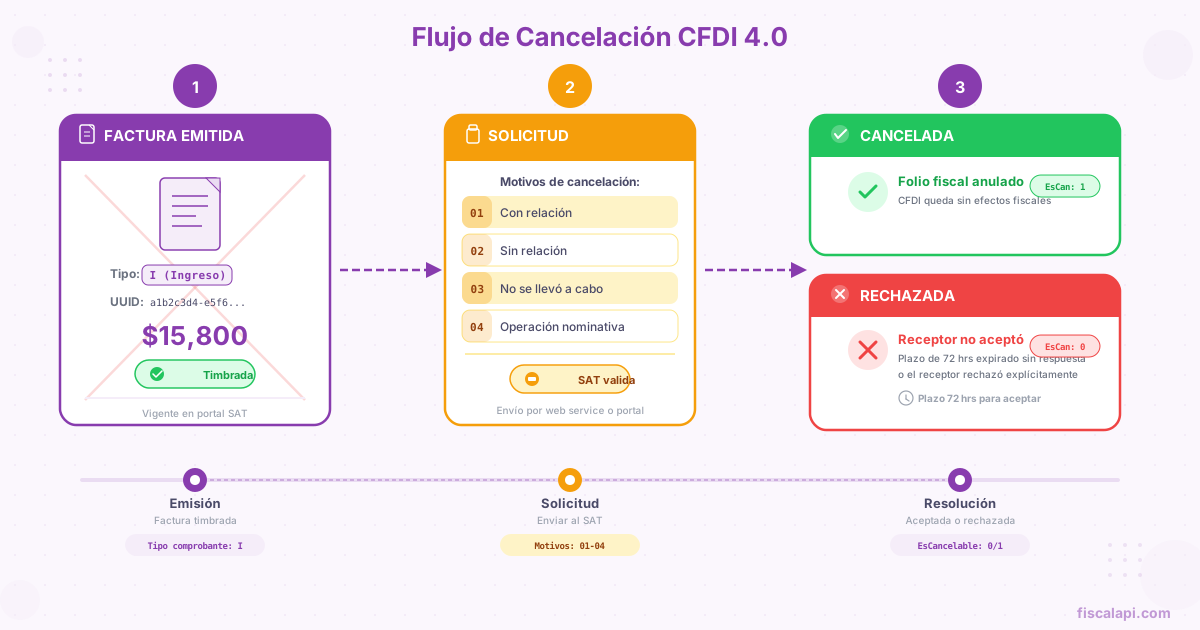
Since January 1, 2022, every cancellation request must include a cancellation reason (one of the SAT keys 01 to 04). It isn't optional. If your system sends a cancellation without a reason, the PAC rejects it before it reaches the SAT.
| Key | Reason | When to use it |
|---|---|---|
01 | Comprobante emitido con errores con relación | The CFDI has errors and you're going to issue a new one that replaces it. You have to provide the UUID of the replacement CFDI. |
02 | Comprobante emitido con errores sin relación | There are errors, but you aren't going to issue a replacement. The CFDI is canceled and that's the end of it. |
03 | No se llevó a cabo la operación | The transaction never happened. You invoiced something that in the end wasn't sold or delivered. |
04 | Operación nominativa relacionada en una factura global | The recipient asked for their own invoice for a sale that was already included in a global invoice (factura global, one CFDI that groups a period's sales to the general public), so you cancel the global invoice. |
Reason 01 has a catch that isn't obvious: you need to provide the UUID (folio fiscal, the unique ID the PAC assigns when it stamps a CFDI) of the CFDI that replaces the canceled one. That means you first stamp the new CFDI (stamping: the certification by a SAT-authorized provider that makes a CFDI valid) and then cancel the old one with the new one's UUID. The order matters. If you try to cancel first without the replacement UUID, the request fails.
Reason 01: the replacement flow
This is the most common reason in automated systems, and the core of a CFDI replacement (you issue a corrected CFDI related to the original with relationship type 04, then cancel the original with reason 01). A CFDI has an error, such as a wrong RFC (Mexico's taxpayer ID, Registro Federal de Contribuyentes), a wrong amount, or the wrong CFDI use (how the recipient will use the CFDI for tax purposes), and you need to issue a corrected one.
Identify the error in the original CFDI#
Figure out which field has the error. If the error doesn't affect whether the CFDI is valid for tax purposes (like a line item's description), decide whether you need to cancel at all or can leave it as it is.
Stamp the new, corrected CFDI#
Generate and stamp the CFDI with the correct data. This new CFDI must point to the previous one as its related CFDI (a CFDI this one replaces, credits, or pays, with its TipoRelacion key) using relationship type 04 (Sustitución de los CFDI previos, replacement of previous CFDIs). The PAC returns the new CFDI's UUID.
Request the cancellation of the original CFDI#
Send the cancellation request with reason 01 and include the new CFDI's UUID as the replacement UUID. It has to be the UUID of the CFDI that relates the original with type 04.
Wait for acceptance (if it applies)#
If the CFDI falls under the flow with the recipient's acceptance, you have to wait for the recipient to accept. In the meantime, both CFDIs coexist: the original with its cancellation in process, and the new one already active (vigente: not canceled with the SAT).
Canceling without the recipient's acceptance
Not every CFDI needs the recipient to approve its cancellation. The SAT defines exceptions where the cancellation goes through directly. The most common ones are below; Rule 2.7.1.35 of the Resolución Miscelánea Fiscal (RMF, the SAT's annual tax rules) lists all of them.
Canceled without acceptance
- CFDIs with a total of $1,000.00 MXN or less, except CFDIs that carry the payment complement (the complement that records each payment received against a
PPDinvoice; the typePCFDI that carries it is also called REP), which require acceptance whatever the amount - Payroll CFDIs (the CFDIs issued for each salary payment, type
N) - Credit notes (Egreso CFDIs, type
E) - Transfer CFDIs (type
T, which move goods without a sale), such as one that carries a Carta Porte (the CFDI complement that documents the transport of goods in Mexico) and has no tax value - CFDIs issued to the generic RFC
XAXX010101000for sales to the general public (customers who did not ask for their own CFDI) - CFDIs issued to the RFC for transactions with foreign residents,
XEXX010101000 - CFDIs canceled by the next business day after they're issued
Acceptance required
Everything that doesn't fall under an exception. In practice, this covers most income invoices (type I, the regular sales invoice) between companies, which are exactly the ones that get canceled the most.
If your system handles B2B invoicing with amounts over $1,000.00 MXN, you need to build the full flow with the recipient's acceptance. There are no shortcuts.
Rule 2.7.1.35 counts the next-business-day window from issuance, and a CFDI's issue date can be earlier than its stamping date, the one recorded in the digital tax stamp (Timbre Fiscal Digital, the SAT seal the PAC adds to a CFDI), if there's a gap between generating the XML and stamping it. Count the window from the issue date so you don't run past it.
CFDI cancellation acceptance: the flow with the recipient
When the CFDI doesn't fall under any exception, the recipient has to approve the cancellation. This flow uses the SAT as an intermediary through the tax mailbox (Buzón Tributario).
Three points this diagram doesn't make obvious, but that matter in production:
The recipient has 3 business days to respond, not 3 calendar days. Weekends and holidays don't count. In December, with the holidays, a cancellation can sit in limbo for more than a week.
If the recipient rejects it, the CFDI stays active. You can send a new request, but the rule changes: on a second or later request, if the recipient doesn't respond within the 3 business days, the CFDI isn't canceled. It stays active with the status Plazo vencido until the recipient accepts. In practice, the way out is to negotiate directly with the recipient, outside the SAT's system.
The notification reaches the recipient through the tax mailbox. If the recipient doesn't have an active tax mailbox or doesn't check it, they don't find out. But the 3 days run anyway, and on a first request the cancellation is accepted automatically when they're up. This causes real business disputes: "they canceled an invoice without my consent" is a frequent complaint that in practice means "I didn't check my tax mailbox."
CFDI statuses during a cancellation
A CFDI can have four different statuses with the SAT during a cancellation. Your system needs to handle all of them.
| Status | What the SAT status check returns | Meaning |
|---|---|---|
| Active | Vigente, with no cancellation status | The CFDI is active and valid for tax purposes |
| Canceled | Cancelado, with Cancelado sin aceptación, Cancelado con aceptación, or Plazo vencido | The cancellation went through |
| Cancellation in process | Vigente, with En proceso | The request was sent, but the recipient hasn't responded |
| Cancellation rejected | Vigente, with Solicitud rechazada (or Plazo vencido after a second request) | The cancellation didn't go through |
When you request a cancellation and the PAC returns 201, don't assume the CFDI is going to be canceled. A 201 only means the SAT received the request (a 202 means the CFDI was already canceled), and the recipient can still reject it. Your system has to implement polling or a webhook to detect when the status changes from En proceso to Cancelado, or stays Vigente (rejected).
Deadlines to cancel a CFDI
The SAT doesn't let you cancel invoices whenever you want. There's a time window, and if you miss it, the CFDI stays active for good.
The general rule: you can cancel a CFDI until the deadline to file the annual tax return for the fiscal year the CFDI belongs to.
What counts is the month in which the annual return is due: that's how Article 29-A of the Código Fiscal de la Federación (Mexico's Federal Tax Code) sets the deadline. Once that month is over, the CFDIs from that fiscal year can no longer be canceled.
How to cancel a CFDI through the API
Canceling through an API follows the same flow as the SAT portal, but automated through a PAC. Your system sends the request to the PAC, the PAC passes it to the SAT, and the SAT responds with a code.
The data you need to send for any cancellation:
- Issuer's RFC: whoever issued the CFDI
- CFDI's UUID: the UUID of the CFDI you want to cancel
- Cancellation reason: key
01,02,03, or04 - Replacement UUID: required only when the reason is
01. It's the UUID of the new CFDI that replaces the canceled one
The PAC's code only tells you whether the SAT received the request (201), whether the CFDI was already canceled (202), or why the request was rejected. Whether the cancellation went through right away, is waiting for acceptance, or was rejected by the recipient, you learn from the SAT status check afterward. Your code has to handle all three scenarios.
If you need to build CFDI cancellation into your application, Fiscalapi exposes REST endpoints that hide the complexity of the PAC and the SAT. See the API documentation for the implementation details, or check the SDKs on GitHub if you'd rather use a ready-made library.
Common mistakes when you cancel CFDIs
After debugging hundreds of failed cancellations, these are the mistakes that keep coming up. If your cancellation system is failing, it's probably one of these.
How a cancellation affects your accounting
Canceling a CFDI isn't only a technical matter. It has tax and accounting consequences that your system should reflect.
When you cancel an income invoice, the related income drops out of your tax return for that period. If you already reported that income in a monthly provisional payment return, you need to file an amended return to adjust the figures. The same goes for the recipient: if they already deducted that invoice, they lose the deduction.
For invoices whose CFDI use implies a direct deduction (like G03, Gastos en general, general expenses), the cancellation can affect the recipient's ISR (Mexico's income tax, Impuesto Sobre la Renta) and creditable IVA (IVA: Mexico's value-added tax, VAT; IVA credit: acreditamiento, offsetting the VAT you paid against the VAT you charge). Your system should at least warn the user when they cancel a CFDI issued more than 30 days earlier, because both parties have probably already reported that transaction in their returns.
If you cancel a CFDI with reason 01 (replacement), the new CFDI should be stamped in the same fiscal year as the original. Issuing the replacement in a different fiscal year creates discrepancies between what was declared and what was invoiced that are hard to correct.
Implementation checklist
If you're building a CFDI cancellation module, these are the minimum technical requirements it has to cover.
Ask for and validate the cancellation reason before you send the request to the PAC
Require the replacement UUID when the reason is 01, and check that it's an active CFDI that relates the original with type 04
Detect whether the CFDI has related payment complements and force their cancellation first
Handle the three possible outcomes: canceled, in process (En proceso), and rejected. A 201 from the PAC only means the SAT received the request
Implement polling or webhooks to resolve requests left in process (En proceso)
Validate that the CFDI is within the cancellation deadline before you start the process
Store the reason, request date, and final status of each cancellation in your database for audits