

CFDI payment complement: a practical guide
April 4, 2026
I've spent years integrating electronic invoicing systems, and one topic causes more confusion than any other: the CFDI payment complement (CFDI: Mexico's electronic invoice; payment complement: the complement that records each payment received against a PPD invoice; the type P CFDI that carries it is also called REP). The idea itself is easy to grasp. The trouble is that the SAT (Mexico's tax authority, Servicio de Administración Tributaria) decided that recording a payment should involve two different documents, fields that sound alike but mean different things, and a flow that nobody explains end to end in one place. Until you see it work from start to finish, it looks like a bureaucratic maze. It isn't one. The logic is sound, and once you get it, everything falls into place.
What is a CFDI payment complement
The payment complement (complemento de pago) is a tax document, a payment CFDI (type P), that proves a payment was made on an invoice issued before the money arrived. In SAT terms, it's a Comprobante Fiscal Digital por Internet that complements an original invoice whose payment method (whether the CFDI is paid in full when issued, PUE, or later or in installments, PPD; not how the customer pays) is PPD (paid in installments or later, Pago en parcialidades o diferido).
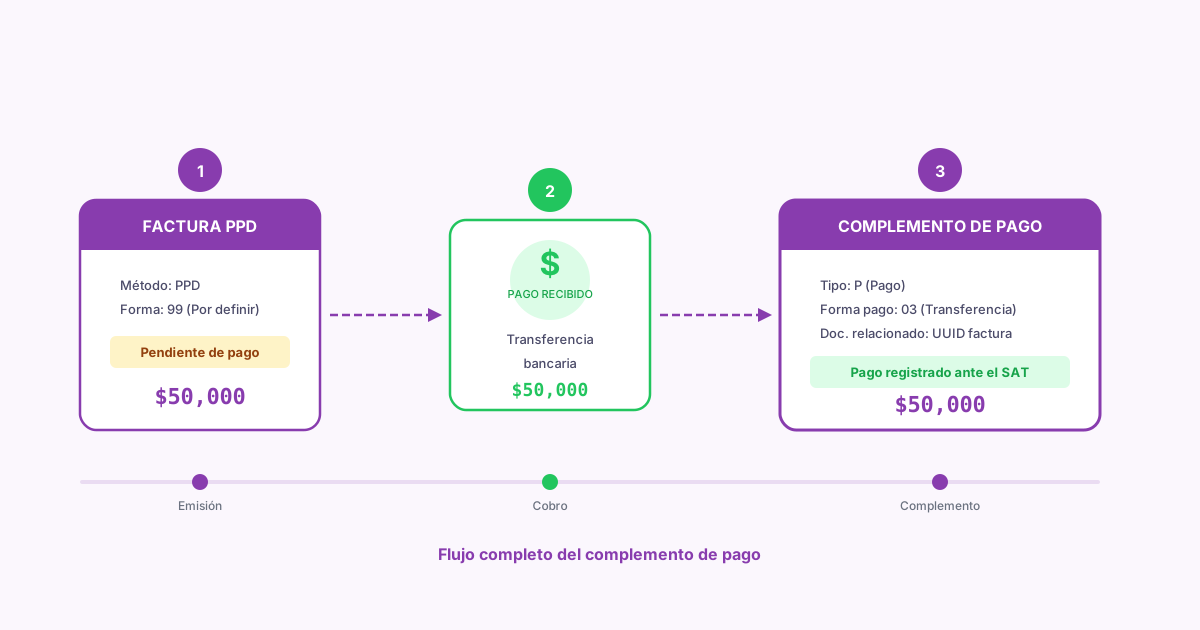
The mechanics are straightforward. When you sell on credit or in installments, you can't tell the SAT you've been paid, because you haven't. So you issue the invoice with method PPD and form of payment (how the customer paid: cash, bank transfer, card; the FormaPago key) 99 (Por definir, to be defined). When the customer finally pays, you issue the payment complement stating how much they paid, when, how, and which invoice that payment applies to.
The payment complement has existed since 2017, but version 2.0 (in force since January 2022 and mandatory since April 2023) made it stricter. It now includes a tax breakdown for each paid invoice and a tax summary for the whole payment. The SAT wants to know exactly which taxes each peso you receive covers.
The payment complement isn't optional. If you issued an invoice with method PPD, you're required to issue the payment complement when you receive the money. Skipping it can lead to tax discrepancies and requests from the SAT. The deadline to issue it is the 5th calendar day of the month after the month you received the payment.
PUE vs PPD: two paths, one destination
The difference between PUE (paid in full when the CFDI is issued, Pago en una sola exhibición) and PPD determines whether you need a payment complement. It looks simple, and it is, but the number of people who pick the wrong method in production is alarming.
PUE: Pago en una sola exhibición
You use PUE when the customer pays you at the time of the transaction or within the same calendar month in which you issue the invoice. You collect, you invoice, done. There's no second document.
The form of payment must be the real one: 03 for a transfer, 01 for cash, 04 for a credit card. Never 99 with PUE.
It's the cleanest flow. One CFDI and you're done with it.
PPD: Pago en parcialidades o diferido
You use PPD when the customer will pay you later: in 30 days, in 60 days, in 3 monthly installments, whenever their budget comes through. The invoice goes out with form of payment 99 (Por definir) because when you invoice, you don't know how or when they'll pay.
Every time the customer makes a payment (partial or full), you issue a payment complement. If they pay in 3 installments, you issue 3 payment complements.
More work, but it reflects the transaction as it happened.
The golden rule: if you've already been paid or will be paid in the same month, use PUE. If the payment falls in a different month from the invoice, use PPD. I've seen companies use PPD for everything "to be safe," and they end up issuing payment complements they didn't need. Others use PUE for credit sales and then can't prove when they received the money. Both mistakes cost time and lead to SAT findings. More on choosing the method in the Spanish-language PUE vs PPD guide.
Full flow: from the PPD invoice to the payment complement
This diagram shows the real flow of a transaction with method PPD, from issuing the invoice until the payment complement is stamped (stamping: the certification by a SAT-authorized provider that makes a CFDI valid).
What a lot of people miss in this diagram: the PAC (Proveedor Autorizado de Certificación, a SAT-authorized provider that stamps CFDIs) validates the complement's own data, such as amounts, balances, and taxes, but it doesn't check that the UUID (folio fiscal, the unique ID the PAC assigns when it stamps a CFDI) of the paid invoice exists or that the invoice is active (vigente: not canceled with the SAT). If the original invoice was canceled, the payment complement still gets stamped. Sounds like an edge case, but in systems with thousands of invoices and asynchronous flows, it happens more than you'd like.
How to issue a payment complement
Issue the original invoice with method PPD#
Create an income invoice (type I, the regular sales invoice) with paymentMethodCode: "PPD" and paymentFormCode: "99". This invoice records the obligation to pay, not the payment itself. Save the UUID the PAC returns; you need it to link the complement.
When the customer pays (in full or in part), your system records the date, the amount, the real form of payment (transfer, check, cash), and the exchange rate if the invoice is in a foreign currency.
Create a payment CFDI (type P) that includes the payment date, the form of payment, the amount paid, the currency, and, in the paid invoices section (DoctoRelacionado), the UUID of the original invoice with the installment number, the previous balance, the amount being paid, and the remaining balance.
With payment complement 2.0, you must include the tax breakdown for each paid invoice: IVA (Mexico's value-added tax, VAT), ISR (Mexico's income tax, Impuesto Sobre la Renta), and IEPS (Mexico's excise tax on specific goods and services, Impuesto Especial sobre Producción y Servicios). You also include a total summary of the payment's transferred taxes (traslado, a tax the issuer charges the recipient) and withheld taxes (retención). This step didn't exist in version 1.0, and it's where most mistakes happen.
Send the payment CFDI to the PAC for stamping. Once it's stamped, deliver it to the customer. The payment complement must be issued no later than the 5th calendar day of the month after the month in which the payment was received.
A single payment complement can cover payments to several invoices. If a customer sends you one transfer that covers 3 different invoices, you don't need 3 complements. One complement with 3 paid invoices is valid and more efficient.
What changed in payment complement 2.0
Version 2.0 of the payment complement took effect on January 1, 2022, and became the only version accepted on April 1, 2023, when the transition period with version 1.0 ended. The changes weren't cosmetic. They broke integrations that worked perfectly with version 1.0.
The biggest change: the payment complement must now include the tax breakdown for each paid invoice. Before, taxes were recorded only on the original invoice. Now the SAT wants to see, in each payment, exactly how much IVA, ISR, or IEPS belongs to that specific payment.
This means that if an invoice has 16% IVA and the customer pays half, the payment complement must reflect the IVA proportional to that partial payment. The IVA that goes in is the share that matches the amount paid, not the invoice's total IVA.
Other changes in payment complement 2.0:
The Totales node was added. It sums up the total amounts of withheld and transferred taxes for the whole complement. It's a summary, but the SAT uses it to reconcile automatically.
Leaving tax fields empty is no longer an option. Before, you could omit them and the PAC accepted it. Now, if the original invoice had taxes, the complement has to carry them proportionally.
The tax object field (whether an item is subject to tax, ObjetoImp) became mandatory on the payment CFDI's line item. The line item of the payment always carries 01 (No objeto de impuesto, not subject to tax), because the taxes are broken down in the paid invoices section, not on the line item.
If your system calculated payment complements with version 1.0 logic, changing the version number isn't enough. The tax structure changed completely. You need to recalculate the tax shares for each partial payment. Plenty of integrations went down in production because someone assumed it was a minor change.
Form of payment vs payment method vs payment complement
These three concepts cause confusion out of all proportion to how complex they are. They sound alike, they show up together in the XML, and each one means something different.
How you were paid. It's the physical or electronic means used to make the payment. The SAT has a catalog with 22 keys; these are the most common:
01Efectivo (cash)03Transferencia electrónica de fondos (electronic funds transfer)04Tarjeta de crédito (credit card)06Dinero electrónico (electronic money)28Tarjeta de débito (debit card)99Por definir (to be defined; only with PPD)
On a PUE invoice, the form of payment is the real one. On a PPD invoice, it's always 99, because when you issue the invoice you don't know yet how you'll be paid. The real form of payment shows up later, in the payment complement.
An easy way to remember it: the method is the when, the form is the how, and the complement is the proof.
Common mistakes when issuing payment complements
After reviewing hundreds of integrations, these are the mistakes I see most often. Some are trivial, and others cost you hours figuring out why the PAC rejects the CFDI.
Wrong UUID for the paid invoice. The PAC doesn't check the UUID of the paid invoice. If it's off by a single character, or the invoice was canceled, the complement still gets stamped, and the payment points to an invoice that doesn't exist or no longer counts. Always check that the UUID exists and the CFDI is active before you build the complement.
Taxes that aren't proportional to the amount paid. With payment complement 2.0, taxes must be calculated in proportion to the payment. If the invoice is for $10,000 MXN + IVA ($11,600 MXN in total) and the customer pays half, $5,800 MXN, the complement's IVA must be $800 MXN (16% of the $5,000 MXN base that payment covers), not $1,600 MXN. I've seen systems copy the original invoice's total taxes into the complement. The PAC accepts them sometimes, but the SAT catches the inconsistency.
Wrong installment number. The first payment is installment 1, the second 2, and so on. If you issue two complements with installment 1, the PAC doesn't reject the second one: the Pagos 2.0 rules don't compare a complement with earlier payments. Your system has to keep a reliable counter for each invoice.
Miscalculated remaining balance. The remaining balance is what's left to pay after the current payment. If the invoice was for $10,000 MXN and the first payment was $4,000 MXN, the remaining balance is $6,000 MXN. On the last payment, the remaining balance must be exactly 0. Not 0.01, not -0.01. Zero. Rounding differences are the number one cause of rejections on the last payment of an installment series.
To avoid rounding problems in the remaining balance of the last payment, calculate the last payment's amount as the difference between the previous balance and zero, instead of repeating the expected installment amount. That way you absorb any cent of difference from accumulated rounding.
How to issue a payment complement with Fiscalapi
Issuing a CFDI payment complement takes two steps: first the PPD invoice, then the complement when the payment arrives. With Fiscalapi you can automate both. You send the UUID of each paid invoice, its balances, and the tax base that matches the payment; the API calculates each tax amount, the payment's tax summary, and the complement's totals, and stamps the CFDI. The SDKs for .NET, Node.js, Python, PHP, and Java let you issue the PPD invoice and its payment complement in a few lines of code. You can see complete working examples in the GitHub repository.
Fiscalapi doesn't read the original invoice to work out the proportion: the base for each partial payment comes from your system, and from it the API calculates how much IVA goes with that payment. The full documentation covers more complex scenarios: payments in a foreign currency, several invoices in one complement, and canceling payment complements.
You can test all of this in the test environment (test.fiscalapi.com) at no cost and with no tax consequences. The test environment runs the stamping flow, including stamping validations.