

Payroll CFDI: the Nómina 1.2 complement guide
April 6, 2026
The payroll CFDI (CFDI: Mexico's electronic invoice; payroll CFDI: the CFDI issued for each salary payment, type N) is probably the most complex tax document you'll integrate. The number of fields is high, but that's not the problem. Every field connects to a labor calculation, a SAT (Mexico's tax authority, Servicio de Administración Tributaria) table, or a social security rule that changes every year. I've seen teams integrate income invoices (type I, the regular sales invoice) in a week and then take two months to get payroll running in production. The hard part is the domain. Payroll touches ISR (Mexico's income tax, Impuesto Sobre la Renta), IMSS (Mexico's Social Security Institute), and the employment subsidy (subsidio para el empleo, a credit that lowers the ISR withheld from low-income employees). It also runs on a catalog of earnings (percepciones: salary, overtime, bonuses, and other pay) and deductions that the SAT decided to make as granular as possible.
If your system needs to issue payroll CFDIs, this guide covers version 1.2 of Mexico's payroll complement (complemento, an XML extension the SAT defines for specific operations): its structure, the nodes it's made of, the SAT catalogs you need, and the errors you'll run into in production.
What is a payroll CFDI
A payroll CFDI (CFDI de nómina in Spanish) is a type N CFDI that documents the payment of salaries, wages, and income treated as salaries to employees. Every time a company pays an employee, whether weekly, semi-monthly, or monthly, it must issue an individual payroll CFDI for that employee, normally one for each pay period.
The structure has two layers. The first is the standard CFDI 4.0, with its Comprobante, Emisor, Receptor, and Conceptos nodes. The second is the payroll complement (Nómina 1.2), an additional XML block that holds all the employment data: earnings, deductions, other payments, employer data, and employee data. The complement is where the real complexity lives.
Version 1.2 of the payroll complement has been in force since 2017 and hasn't changed its version number, although the SAT has published several revisions of the validation rules. The same number doesn't mean the rules are the same as in 2017.
Every employer in Mexico, both legal entities (persona moral) and individuals (persona física) with employees, must issue payroll CFDIs. There's no exception for size. If you have a single employee, you issue payroll CFDIs. The obligation also covers payments of income treated as salaries (fees treated as salaries, commission agents, and so on).
Payroll CFDI structure: envelope and complement
A payroll CFDI is an XML with two parts that fit together: the envelope (CFDI 4.0) and the content (the Nómina 1.2 complement). This diagram shows how they relate.
The Comprobante node of a payroll CFDI has quirks that set it apart from a regular invoice. The CFDI type is N (payroll). The form of payment (how the customer paid: cash, bank transfer, card; the FormaPago key) isn't sent at all: the SAT's payroll filling guide says the FormaPago field must not exist in a payroll CFDI. The payment method (whether the CFDI is paid in full when issued, PUE, or later or in installments, PPD; not how the customer pays) is always PUE (Pago en una sola exhibición). The recipient's CFDI use (how the recipient will use the CFDI for tax purposes) is CN01 (Nómina, payroll). There's a single line item, with SAT product or service key 84111505 (Servicios de contabilidad de sueldos y salarios, payroll accounting services) and unit of measure key ACT (Actividad, activity).
CFDI envelope nodes
| Node | Key field | Value for payroll |
|---|---|---|
| Comprobante | TipoDeComprobante | N |
MetodoPago | PUE | |
FormaPago | Omitted: the field must not exist in a payroll CFDI | |
LugarExpedicion | Postal code of the employer's place of issue | |
Moneda | MXN (always Mexican pesos) | |
| Emisor | RegimenFiscal | The employer's tax regime (régimen fiscal, the SAT category a taxpayer is registered under, such as 601 or 626) |
| Receptor | UsoCFDI | CN01 (Nómina) |
RegimenFiscalReceptor | 605 (Sueldos y Salarios e Ingresos Asimilados a Salarios, salaries, wages, and income treated as salaries) | |
| Concepto | ClaveProdServ | 84111505 |
ClaveUnidad | ACT | |
ObjetoImp | 01 (No objeto de impuesto, not subject to tax) |
The recipient's tax regime in a payroll CFDI is always 605 (Sueldos y Salarios e Ingresos Asimilados a Salarios), and that includes employees paid income treated as salaries. If you send any other key, stamping (the certification by a SAT-authorized provider that makes a CFDI valid) fails: the PAC (Proveedor Autorizado de Certificación, a SAT-authorized provider that stamps CFDIs) rejects the CFDI with error NOM11.
Nómina 1.2 complement nodes
The complement holds the data that matters most for payroll. These are the main nodes.
| Node | Main fields | Description |
|---|---|---|
| Nomina | TipoNomina, FechaPago, FechaInicialPago, FechaFinalPago, NumDiasPagados, TotalPercepciones, TotalDeducciones, TotalOtrosPagos | General data for the pay period |
| Emisor (in the complement) | RegistroPatronal | The employer registration number (registro patronal, assigned by IMSS, Mexico's Social Security Institute) |
| Receptor (in the complement) | NumSeguridadSocial, FechaInicioRelLaboral, Antigüedad, TipoContrato, TipoJornada, PeriodicidadPago, SalarioBaseCotApor, SalarioDiarioIntegrado, ClaveEntFed, Departamento, Puesto, RiesgoPuesto | The employee's employment data |
| Percepciones | TotalSueldos, TotalGravado, TotalExento | Container for the individual earnings items |
| Deducciones | TotalOtrasDeducciones, TotalImpuestosRetenidos | Container for the individual deductions |
| OtrosPagos | No attributes | Employment subsidy, travel expenses (viáticos), refunds of ISR withheld in excess |
The TipoNomina field takes two values: O for a regular payroll (Nómina ordinaria), the pay for the period, and E for an off-cycle payroll (Nómina extraordinaria): items that aren't paid on a regular schedule, such as the aguinaldo (the mandatory annual Christmas bonus), PTU (employee profit sharing), severance, or a final settlement. The employer makes the classification, and mixing up the two is a frequent mistake. If you pay the aguinaldo in its own run, it's an off-cycle payroll, and PeriodicidadPago must be 99. If it goes out with the regular pay, the SAT's filling guide keeps TipoNomina O with the regular pay period.
Earnings: what the employee receives
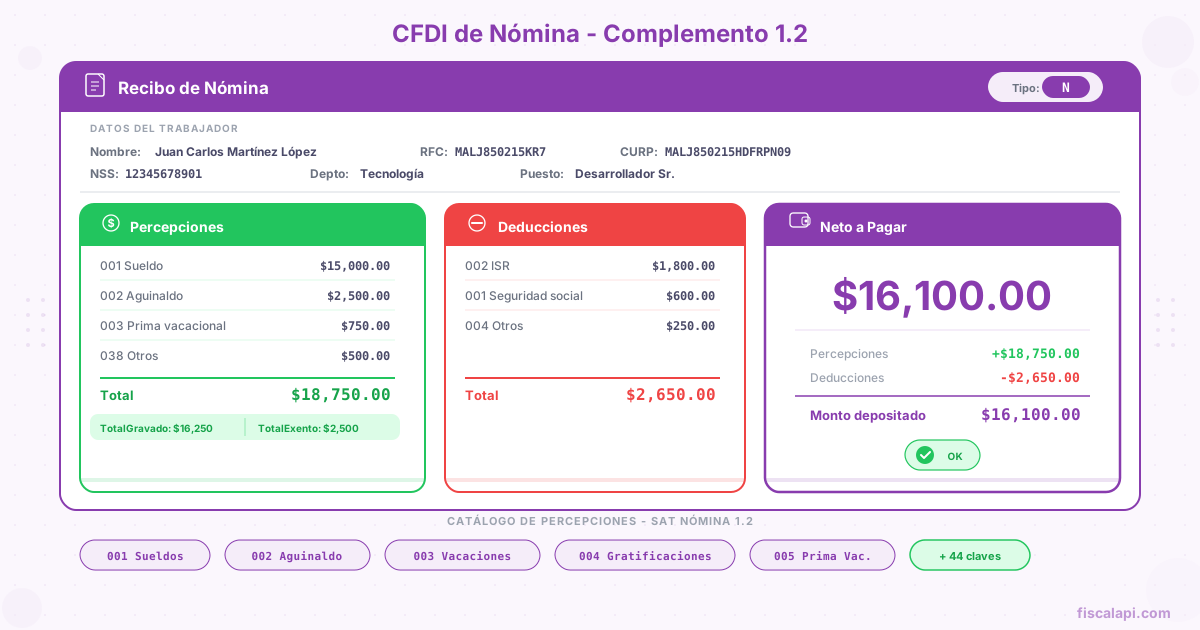
Earnings are all the income the employee receives from the employment relationship. Each earnings item has a type (a key from the c_TipoPercepcion catalog), a taxable amount, and an exempt amount. The split between taxable and exempt is critical for the ISR calculation. The exemption limits are expressed in UMA (Unidad de Medida y Actualización, the reference value Mexican law uses for limits and fines, updated every year). The table shows a selection of the catalog's keys.
| Key | Earnings type | Taxable | Exempt |
|---|---|---|---|
| 001 | Sueldos, Salarios Rayas y Jornales (salaries, wages, and daily pay) | Yes | No |
| 002 | Gratificación Anual (Aguinaldo) (annual Christmas bonus) | Partly | Up to 30 UMA |
| 003 | Participación de los Trabajadores en las Utilidades PTU (employee profit sharing) | Partly | Up to 15 UMA |
| 004 | Reembolso de Gastos Médicos Dentales y Hospitalarios (reimbursement of medical, dental, and hospital expenses) | No | Yes |
| 005 | Fondo de Ahorro (savings fund) | Partly | Conditional |
| 010 | Premios por puntualidad (punctuality bonuses) | Yes | No |
| 019 | Horas extra (overtime) | Partly | 50%, up to 5 UMA per week (all of it for minimum-wage employees) |
| 020 | Prima dominical (Sunday premium) | Partly | Up to 1 UMA per Sunday worked |
| 021 | Prima vacacional (vacation premium) | Partly | Up to 15 UMA |
| 022 | Prima por antigüedad (seniority premium) | Partly | Up to 90 UMA per year of service |
| 025 | Indemnizaciones (indemnities) | Partly | Up to 90 UMA per year of service |
| 028 | Comisiones (commissions) | Yes | No |
| 029 | Vales de despensa (grocery vouchers) | Partly | Conditional |
| 031 | Vales de gasolina (gas vouchers) | Partly | Conditional |
| 039 | Jubilaciones, pensiones o haberes de retiro (retirement benefits, pensions, or retirement pay) | Partly | Up to 15 UMA per day |
| 045 | Ingresos en acciones o títulos valor que representan bienes (income in shares or securities that represent assets) | Yes | No |
You'll often see two more limits quoted for these keys: 10% of the SBC (salario base de cotización, the base salary for social security contributions) for punctuality bonuses, and 40% of the daily UMA for grocery vouchers. Both come from Article 27 of the Social Security Law (LSS, Ley del Seguro Social). They keep those amounts out of the IMSS contribution base, but they don't make them exempt from ISR.
The UMA changes every year. From February 1, 2026, the daily UMA is $117.31 MXN; the 2025 value, $113.14 MXN, applied through January 31, 2026. Every earnings exemption limit is calculated with the UMA in force, not with the minimum wage. If your system hardcodes the UMA instead of making it configurable, you'll have problems every February, when it's updated.
The Percepciones node groups all the individual earnings items and carries three totals: TotalSueldos (the sum of the salary-type earnings), TotalGravado (the sum of the taxable amounts of all earnings), and TotalExento (the sum of the exempt amounts). These totals must add up exactly to the individual items. If they're off by one cent, the PAC rejects the stamping.
Deductions: what's withheld from the employee
Deductions are every discount applied to the employee's pay. The SAT's c_TipoDeduccion catalog has more than 100 keys, but most payroll CFDIs use only a handful of them, such as these.
| Key | Deduction type | Description |
|---|---|---|
| 001 | Seguridad social (social security) | The employee's IMSS contributions |
| 002 | ISR | ISR withheld |
| 003 | Aportaciones a retiro, cesantía en edad avanzada y vejez (contributions for retirement, unemployment at an advanced age, and old age) | The employee's share of retirement savings contributions |
| 004 | Otros (other) | Generic deductions not classified elsewhere |
| 005 | Aportaciones a Fondo de vivienda (housing fund contributions) | Housing fund contributions. INFONAVIT's (Mexico's workers' housing fund) 5% is paid by the employer; see below |
| 006 | Descuento por incapacidad (work incapacity deduction) | Days not worked because of a work incapacity |
| 007 | Pensión alimenticia (child or spousal support) | Deduction ordered by a court |
| 008 | Renta (rent) | Deduction for housing provided by the employer |
| 009 | Préstamos provenientes del Fondo Nacional de la Vivienda para los Trabajadores (loans from INFONAVIT) | INFONAVIT loan |
| 010 | Pago por crédito de vivienda (housing loan payment) | Withholding for an INFONAVIT loan |
| 012 | Anticipo de salarios (salary advance) | Deduction for an advance the employer granted |
| 019 | Cuotas sindicales (union dues) | Withholding for the union |
Tax deductions
Deductions with key 002 (ISR) add up to the TotalImpuestosRetenidos field of the Deducciones node. This field feeds straight into the employer's withholding (retención) returns. If the ISR withheld doesn't match the ISR rate tables in force, the error carries over to the employee's pre-filled annual tax return, which the SAT builds from payroll CFDIs.
Calculating payroll ISR isn't trivial. It involves the rate table in Article 96 of the Income Tax Law (LISR, Ley del Impuesto sobre la Renta), the employment subsidy, and adjustments by pay period. One cent rounded wrong adds up over 24 semi-monthly periods and creates differences in the employee's annual tax return.
Social security deductions
Keys 001 and 003 hold the employee's share of IMSS contributions and of the retirement, unemployment at an advanced age, and old age contributions. INFONAVIT works differently: the 5% housing contribution is paid by the employer and doesn't come out of the employee's pay. What you do deduct is the repayment of an INFONAVIT loan (keys 009 and 010). These contributions are calculated on the SBC, which isn't the same as net pay or gross pay.
The SBC folds in benefits such as the aguinaldo, the vacation premium, and any benefit above the legal minimums. If your system calculates IMSS contributions on the monthly salary instead of the SBC, the deductions will be wrong and IMSS will claim the differences.
OtrosPagos: the node everyone forgets
The OtrosPagos node records items the employer pays that aren't taxable or exempt earnings. The most common case, and the one that causes the most errors, is the employment subsidy.
How to calculate ISR withholding in payroll
The ISR withheld in each pay period is the field that causes the most discrepancies between what the payroll system calculates and what the SAT expects to see. The process involves the Article 96 LISR rate table and the employment subsidy, and it repeats with every payment.
Determine the taxable income for the period#
Add up all the taxable earnings for the period. Leave out the exempt ones. If the employee has taxable overtime, bonuses, commissions, or other variable income, add it to the taxable base salary for the period.
Find the bracket in the Article 96 table#
The rate table has income brackets, each with a lower limit, an upper limit, a fixed amount, and a percentage on the excess. Find the bracket the period's taxable income falls in. The rate tables are published for monthly, semi-monthly, 10-day, weekly, and daily periods. Use the one that matches your pay period.
Calculate the ISR before the subsidy#
Subtract the lower limit from the taxable income to get the excess. Multiply the excess by the bracket's percentage. Add the fixed amount. The result is the computed ISR before the employment subsidy. See the ISR tax brackets for 2026 for the current values.
Take the monthly subsidy from the decree. For pay periods shorter than a month, divide it by 30.4 and multiply it by the days in the period. If the subsidy is greater than or equal to the computed ISR, no ISR is withheld, and the difference isn't paid to the employee. If the ISR is greater than the subsidy, the difference is the ISR withholding that goes in deductions with key 002.
The ISR withheld goes in as a deduction with type 002. The subsidy incurred goes in OtrosPagos with key 002 and its SubsidioAlEmpleo child node. Both must be present for the numbers to add up for the SAT.
I've seen systems that calculate the monthly ISR and divide it by the number of pay periods. That doesn't work. The SAT expects you to use the table for the specific period (semi-monthly, weekly, and so on), not a prorated monthly table. The difference may be cents per period, but over a year it adds up and triggers observations.
Payroll CFDI issuance deadlines
Rule 2.7.5.1 of the 2026 RMF (Resolución Miscelánea Fiscal, the SAT's annual tax rules) lets you issue the payroll CFDI before the payment, or within a number of business days after it that depends on how many employees you have:
| Employees or people paid income treated as salaries | Business days after the payment |
|---|---|
| 1 to 50 | 3 |
| 51 to 100 | 5 |
| 101 to 300 | 7 |
| 301 to 500 | 9 |
| More than 500 | 11 |
In every case, the CFDI counts as issued and delivered on the date you made the payment. There's no window running to the 5th day of the following month, like the one for the payment complement. If you pay for periods shorter than a month, the same rule lets you issue a single monthly CFDI per employee, with one payroll complement for each payment, within the same number of business days after the last day of the month.
In practice, most payroll systems stamp the CFDIs the same day the payroll is deposited to the employees' bank accounts. If your payroll process generates the CFDIs in batch and stamps them later, make sure stamping happens within your window. If stamping fails and you retry after the window closes, the CFDI is late for the payment it covers, and that creates inconsistencies.
For off-cycle payrolls (aguinaldo, PTU, final settlements), the payment date in the complement must match the date the employee received the money, not the date you calculated it. If you calculate the aguinaldo on December 10 but pay it on December 15, the payment date is December 15.
Common payroll stamping errors
After integrating payroll stamping for many companies, I can tell you the errors repeat with an almost comical predictability. These are the ones you'll run into.
Canceling a payroll CFDI
Canceling a payroll CFDI has one advantage over other CFDI types: it doesn't need cancellation acceptance (the recipient's approval that some cancellations require before they take effect). The employer can cancel a payroll CFDI directly, without the employee approving the cancellation in their tax mailbox (Buzón Tributario). Rule 2.7.1.35 of the RMF lists payroll CFDIs among the CFDIs you can cancel without the recipient's acceptance.
The most common cancellation reason (one of the SAT keys 01 to 04) is 02 (issued with errors, no replacement CFDI). If you need to replace a payroll CFDI with a corrected one, you use reason 01 (issued with errors, replaced by a related CFDI) and give the UUID (folio fiscal, the unique ID the PAC assigns when it stamps a CFDI) of the new CFDI that replaces the canceled one. There's more detail on the cancellation flows in the guide on how to cancel a CFDI.
The deadline to cancel a payroll CFDI is the end of the month in which the employer's annual ISR return for the year of issue is due: March 31 of the following year for a legal entity, and April 30 for an individual. If you issued a payroll CFDI with errors in 2026, you have until March 31, 2027 (legal entity) or April 30, 2027 (individual) to cancel it. After that date, the CFDI can no longer be canceled.
Canceling a payroll CFDI doesn't reverse its tax effects automatically. Canceling it doesn't change the withholding returns or the IMSS contributions you already filed for that period. Issue the corrected CFDI and, if the amounts changed, file the matching amended returns. Canceling without reissuing leaves a gap in the payroll data the SAT uses to pre-fill the employee's annual tax return.
How to automate payroll CFDIs with Fiscalapi
Payroll stamping through the Fiscalapi API works the same way as any other CFDI. You build the object with the CFDI and complement data and send it to the invoicing endpoint, and Fiscalapi validates it, seals it, and stamps it through its PAC. The difference is that the payroll payload includes the 1.2 complement with all the earnings, deductions, and other payments nodes.
The payroll CFDI documentation covers the endpoint in full, including the request objects for each node of the complement, and the Payroll 1.2 errors page lists the payroll-specific error codes. The Fiscalapi SDKs on GitHub include examples for the supported languages.