

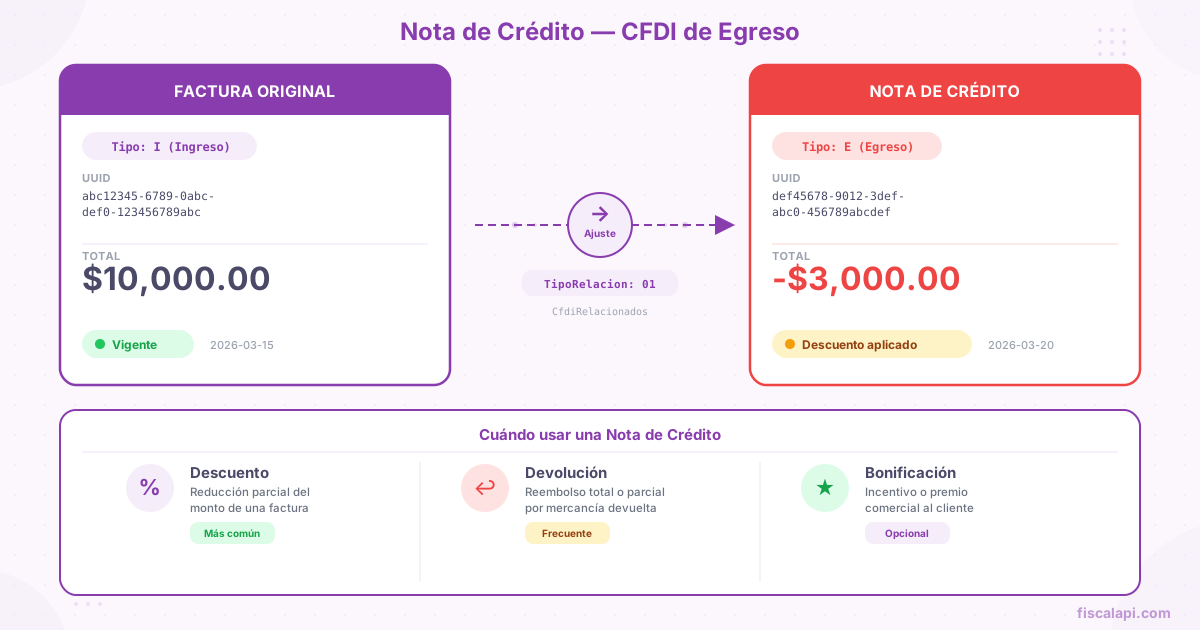
CFDI credit note: when and how to issue one
April 6, 2026
If you've worked with electronic invoicing in Mexico long enough, you know that sooner or later a customer will ask for a discount after you've already invoiced them, or return goods, or someone in accounting will enter the wrong amount. You can't edit a stamped CFDI (CFDI: Mexico's electronic invoice; stamping: the certification by a SAT-authorized provider that makes a CFDI valid). And canceling the whole invoice to reissue it over a partial adjustment is like tearing down a house because the bathroom has a leak. That's what the CFDI credit note (an Egreso CFDI, type E) is for.
What is a CFDI credit note
A credit note in Mexico is an Egreso CFDI that reduces, fully or partly, the value of an income CFDI (type I, the regular sales invoice) you issued earlier. In the XML, the TipoDeComprobante field carries the value "E" (Egreso). The SAT (Mexico's tax authority, Servicio de Administración Tributaria) recognizes it as the official mechanism for applying discounts, rebates, returns, or amount corrections to invoices that are already stamped.
A credit note is tied to the invoice it adjusts. You link it to the UUID (folio fiscal, the unique ID the PAC assigns when it stamps a CFDI) of the original invoice through the CfdiRelacionados node. Anexo 20 (the SAT technical standard that defines the CFDI: its XML structure, catalogs, and validation rules) marks that node as optional, so the PAC (Proveedor Autorizado de Certificación, a SAT-authorized provider that stamps CFDIs) doesn't reject a credit note without it. Include it anyway. The SAT needs to know exactly which income you're reducing and by how much.
A credit note doesn't modify or replace the original invoice. Both documents coexist in the SAT's system. The effect is on the books: the reported income goes down by the credit note's amount. If you need to void an invoice entirely, the right mechanism is CFDI cancellation, not a credit note for the full amount.
When to issue a credit note
Not every correction calls for a credit note. I've seen teams issue credit notes where they should have canceled, and cancel where they should have issued credit notes. The difference is simple, but it matters.
| Scenario | Right action |
|---|---|
| Commercial discount granted after invoicing | Credit note for the discount amount |
| Partial return of goods | Credit note for the value of what was returned |
| Wrong price on one or more line items | Credit note for the difference, or cancel and reissue the CFDI if the error is serious |
| Volume rebate for a customer | Credit note |
Error in the recipient's tax data: RFC (Mexico's taxpayer ID, Registro Federal de Contribuyentes), name, or tax regime (régimen fiscal, the SAT category a taxpayer is registered under, such as 601 or 626) | Cancel the invoice and issue a new one; a credit note doesn't fix tax data |
| Transaction that never took place | Cancel the invoice with cancellation reason 03 (cancellation reason: one of the SAT keys 01 to 04; 03: the transaction did not take place) |
| Duplicate invoice | Cancel the invoice with reason 02 (issued with errors, no replacement CFDI) |
The general rule: if the problem is the amount, use a credit note. If the problem is the data, or the whole transaction is invalid, cancel.
An Egreso CFDI for 100% of an income CFDI is valid when the discount, return, or rebate covers the full amount; the Anexo 20 filling guide includes that case. What doesn't work is using it in place of a cancellation. If you need to void the income entirely, cancel the invoice directly. Using a credit note to simulate a cancellation leads to audit findings.
Structure of the Egreso CFDI
The Egreso CFDI follows the same structure as the CFDI 4.0 you already know, with specific differences in key fields.
| Field | Value in a credit note | Notes |
|---|---|---|
TipoDeComprobante | E | Egreso |
FormaPago | Must match the original invoice's form of payment (how the customer paid: cash, bank transfer, card; the FormaPago key) | If the original invoice used 03 (Transferencia electrónica de fondos, electronic funds transfer), so does the credit note. The Anexo 20 filling guide also accepts the form of payment you use to grant the adjustment |
MetodoPago | PUE | Credit notes are always issued as PUE (paid in full when the CFDI is issued, Pago en una sola exhibición) |
Moneda | Same as the original invoice | If the invoice was in USD, so is the credit note |
TipoCambio | Exchange rate in effect on the issue date | If a foreign currency applies |
LugarExpedicion | The issuer's postal code | Same as in any CFDI |
The issuer and recipient data are identical to the original invoice's. The issuer of the credit note is whoever issued the income invoice, and the recipient is the same customer.
The CfdiRelacionados node
This node links the credit note to the original invoice, which becomes its related CFDI (a CFDI this one replaces, credits, or pays, with its TipoRelacion key). It holds the UUID of the income CFDI and the relationship type code that describes why you're issuing the credit note.
| Field | Description |
|---|---|
TipoRelacion | Code that defines the relationship between the credit note and the original income CFDI |
CfdiRelacionado | UUID of the original invoice |
You can relate a credit note to one invoice or to several if the adjustment applies to more than one document. Each UUID goes in its own CfdiRelacionado element inside the same CfdiRelacionados node.
Relationship types for a credit note
The TipoRelacion field has several possible values in the SAT catalog, but only two matter for discount, rebate, and return credit notes.
Relationship type 01
Nota de crédito de los documentos relacionados (credit note for the related documents). This is the code you use in most cases: retroactive discounts, rebates, amount corrections, price reductions. It covers any adjustment that isn't a physical return of goods.
If your customer tells you "you invoiced me $50,000 MXN, but we agreed on $45,000," the relationship type is 01 and the credit note is for $5,000 MXN.
Relationship type 03
Devolución de mercancía sobre facturas o traslados previos (return of goods on previous invoices or transfers). You use it when the customer returns physical products and you need to reduce the income by the value of what came back.
The difference from 01 is semantic; the accounting is the same. The SAT wants to tell a financial adjustment apart from a real return of goods. In practice, both produce an Egreso CFDI with an identical structure, but the relationship type tells the SAT why it happened.
The other TipoRelacion codes (02, 04, 05, 06, 07) don't apply to discount, rebate, or return credit notes. 07, for example, is for applying an advance payment invoice (the CFDI you issue for money received before you deliver the goods or service) against the final CFDI: a completely different flow, covered in the advance payment invoice guide.
How to issue a credit note, step by step
Find the UUID of the income CFDI you need to adjust. Check that the invoice is active (vigente: not canceled with the SAT) and confirm the total amount, the tax breakdown, the form of payment, and the currency. You need this data to build the credit note correctly.
Calculate the adjustment amount#
Work out the exact amount to reduce. If the discount applies to one or more line items, calculate the adjustment's subtotal and apply the taxes proportionally. A $1,000 MXN discount on a line item taxed at 16% IVA (Mexico's value-added tax, VAT) produces a credit note for a $1,000 subtotal + $160 IVA = $1,160 total.
Build the XML with TipoDeComprobante="E", issuer and recipient data identical to the original invoice's, and line items that reflect the adjustment. Include the CfdiRelacionados node with the right TipoRelacion (01 or 03) and the UUID of the original invoice.
The recipient's CFDI use (how the recipient will use the CFDI for tax purposes) on a credit note is usually G02 (Devoluciones, descuentos o bonificaciones, returns, discounts, or rebates), although it depends on the recipient's tax regime.
Mirror the tax breakdown proportionally#
The credit note's taxes must mirror the structure of the original invoice. If the invoice had line items with 16% IVA and withheld 10% ISR (Mexico's income tax, Impuesto Sobre la Renta), the credit note must include those same taxes, calculated on the adjustment amount. Don't make up rates or drop withholdings (retención) that were in the original.
Send the Egreso CFDI to the PAC for stamping. The PAC validates the tax data and checks that the XML structure meets Anexo 20. Once it's stamped, the PAC sends a copy to the SAT, and the credit note affects the books for the period in which you issue it.
Send the credit note (XML and PDF) to the customer. The recipient needs this document to adjust their own accounting records. Without the electronic credit note, the adjustment doesn't exist for tax purposes for either party.
Tax treatment of a credit note
This is where I've seen the most mistakes in production. The rule is simple, but people ignore it: the credit note's taxes must be proportional to those of the original invoice.
If the original invoice has three line items with different IVA rates, and the credit note applies to only one of them, the credit note's tax breakdown must reflect only that line item's taxes. Don't average rates. Don't apply a generic rate to the total.
| Line item on the original invoice | Amount (MXN) | IVA 16% | Total |
|---|---|---|---|
| Consulting service | $10,000 | $1,600 | $11,600 |
| Software license (exempt) | $5,000 | $0 | $5,000 |
| Technical support | $3,000 | $480 | $3,480 |
| Invoice total | $18,000 | $2,080 | $20,080 |
If the credit note is for a $2,000 MXN discount on the consulting service:
| Line item on the credit note | Amount (MXN) | IVA 16% | Total |
|---|---|---|---|
| Discount on consulting service | $2,000 | $320 | $2,320 |
If you mistakenly apply IVA to the exempt license, or calculate IVA by averaging the three effective rates, the PAC won't reject it. But your books end up wrong, and the SAT can challenge it in an audit.
Never issue a credit note for more than the original invoice (taxes included). The credit note can't exceed the income it adjusts. Some implementations validate this on the PAC side, but not all of them. The PAC not rejecting it doesn't make it correct.
CFDI credit note vs cancellation
How these two mechanisms differ is the question I get most often from development teams. They aren't interchangeable.
Credit note
- Reduces part of an invoice's value
- Both documents stay active with the SAT
- Doesn't need the recipient's approval
- Can be issued weeks or months later
- Applies to discounts, partial returns, rebates
- Creates a new CFDI (type Egreso) with its own UUID
Cancellation
- Voids the original CFDI completely
- The invoice is marked as canceled with the SAT
- Requires cancellation acceptance (the recipient's approval that some cancellations require before they take effect), with exceptions such as amounts of $1,000.00 MXN or less
- Has a deadline
- Applies to serious errors, transactions that never happened, duplicates
- Doesn't create a new document; it only changes the status of the existing one
I've seen a recurring pattern in legacy systems: they cancel the whole invoice and issue a new one with the adjusted amount, instead of issuing a credit note. It works, but it has two problems. First, the cancellation requires the recipient's acceptance, which can take days. Second, the invoice gets a new UUID, and if the customer already recorded the original invoice in their books, they have to redo that entry. A credit note avoids both problems.
For the details of the cancellation process, including cancellation reasons and acceptance flows, see the CFDI cancellation guide.
Accounting effect of a credit note
A credit note reduces the income the issuer reports in the tax period in which it's issued, not in the period of the original invoice. If you invoiced in January and issue the credit note in March, the reduction hits March.
This has direct implications for ISR provisional payments and monthly IVA payments. The income reported in that period's monthly return goes down, which can create a balance in your favor or reduce the tax you owe. Your accounting system needs to record the credit note as a credit in accounts receivable (or a reduction of the original receivable), linked to the right customer.
For the recipient, the credit note reduces the deduction they took with the original invoice. If your customer deducted $20,000 MXN from the invoice and you issue them a credit note for $3,000 MXN, their net deduction is $17,000 MXN.
Common mistakes when issuing credit notes
The full credit note flow
This diagram shows the sequence from the moment the adjustment is identified until both parties have the document on record.
An electronic credit note doesn't need the recipient's acceptance to be active. Once the PAC stamps it and the SAT registers it, the adjustment exists for tax purposes. The recipient receives it and adjusts their books, but doesn't have to "approve" anything, unlike what happens with a CFDI cancellation.
If you need to automate this flow, Fiscalapi exposes endpoints to create Egreso CFDIs with every field they need. The API documentation covers the request structure, including how to pass the related documents and the tax breakdown. The SDKs on GitHub make it easier to build the payload in your language of choice.