

How to verify a CFDI with the SAT
April 6, 2026
You received an invoice. It has a logo, tax details, a UUID (folio fiscal, the unique ID the PAC assigns when it stamps a CFDI), and even a QR code. None of that guarantees it's valid. A CFDI (Mexico's electronic invoice) can be canceled without the PDF showing it. It can carry a made-up UUID. It can be an XML someone altered after stamping (the certification by a SAT-authorized provider that makes a CFDI valid). The only way to know whether an invoice is authentic and active (vigente: not canceled with the SAT) is to verify CFDI data directly with the SAT (Mexico's tax authority, Servicio de Administración Tributaria).
Verifying invoices isn't an optional step. If you deduct a canceled CFDI, the SAT will reject that deduction in an audit. If your system accepts fake invoices, you're recording tax transactions that don't exist. For accountants, auditors, and any system that processes e-invoices, verification is a basic control that should run automatically.
Why you need to verify every CFDI
Three concrete reasons:
Authenticity. Confirm that a PAC (Proveedor Autorizado de Certificación, a SAT-authorized provider that stamps CFDIs) stamped the CFDI and that the SAT has a record of it. A well-formed XML proves nothing on its own. Anyone with some technical knowledge can generate one. Checking against the SAT is the only proof that the invoice is real.
Cancellation status. A CFDI that was active yesterday can be canceled today. The issuer can cancel invoices, and depending on the amount and the time elapsed, it doesn't even need your approval. If you don't check the status before you record an expense or close an accounting period, you're working with information that may be out of date.
Validity for deductions. Article 29-A of the Código Fiscal de la Federación (Mexico's Federal Tax Code) sets the requirements an invoice must meet to be deductible. If the CFDI doesn't exist in the SAT's database, or it's canceled, it doesn't meet those requirements. It's that clear-cut.
Don't rely on the printed representation (the PDF of a CFDI; the XML is the legal document) to decide whether an invoice is valid. The PDF is only a visual rendering of the XML. You can confirm the real status of the CFDI only by checking directly with the SAT.
What gets checked when you verify a CFDI
When you look up a CFDI with the SAT, the response includes several fields that let you confirm the invoice's identity and status.
| Data checked | Description | Example |
|---|---|---|
| UUID (folio fiscal) | 36-character unique identifier the PAC assigns at stamping | 6F8A4C12-3B7E-4D9A-A1F0-8C2E5D7B9F03 |
| Issuer's RFC | The RFC (Mexico's taxpayer ID, Registro Federal de Contribuyentes) of the party that issued the invoice | XAXX010101000 |
| Recipient's RFC | The RFC of the party that receives the invoice | XEXX010101000 |
| Total | The invoice's total amount, taxes included | $15,230.00 |
| Issue date | Date and time the CFDI was issued | 2026-03-15T10:30:00 |
| Status | The invoice's current status in the SAT's database | Vigente, Cancelado, No encontrado |
| Cancelability | If it applies, whether the CFDI can be canceled and under what conditions | Cancelable sin aceptación |
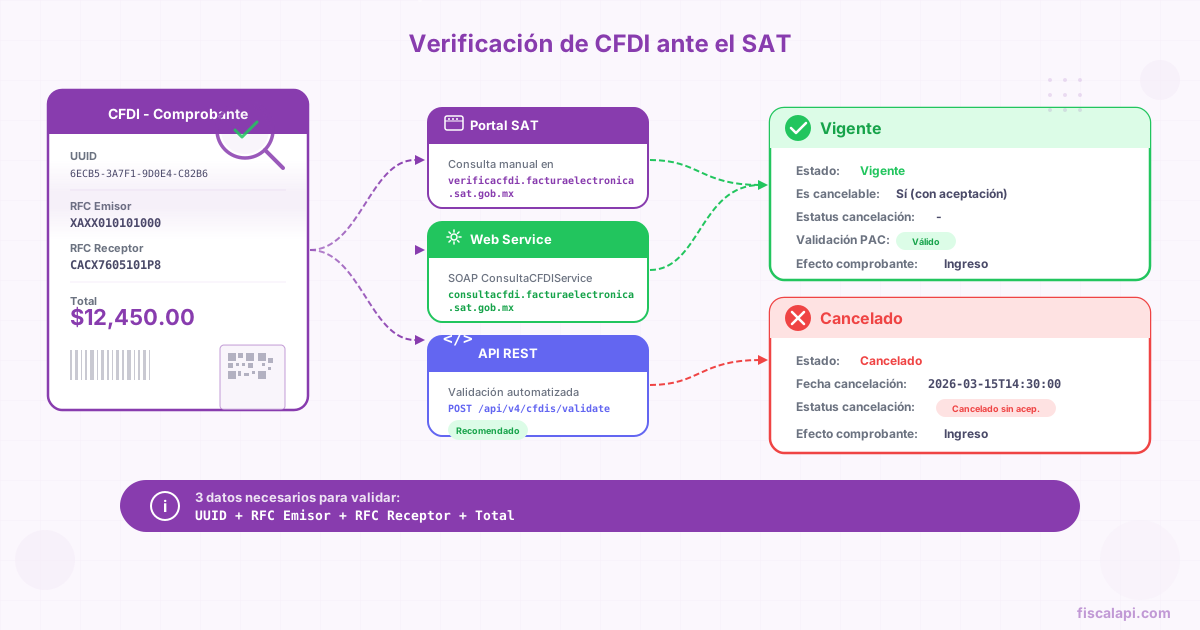
Through the web service and the QR code, the SAT checks that the combination of UUID + issuer's RFC + recipient's RFC + total matches what it has on record. If any of those four values doesn't match, the lookup returns a negative result. Having the right UUID isn't enough: all four fields must match. The manual verifier on the SAT portal asks only for the first three.
The QR code on a CFDI's printed representation contains a verification URL with the UUID, the issuer's RFC, the recipient's RFC, the total, and the last 8 characters of the digital seal (the issuer's signature over the CFDI, made with its CSD). Scan the QR to go straight to the SAT's verification portal with that data prefilled.
CFDI status with the SAT
When you verify an invoice, the SAT returns one of three main statuses. Each one has different implications for your accounting.
CFDI cancelability
Besides the active or canceled status, the SAT reports whether an active CFDI can be canceled and under what conditions. This matters most when you're verifying invoices that could be canceled before you close your accounting period.
| Cancelability status | What it means |
|---|---|
| Cancelable sin aceptación (cancelable without acceptance) | The issuer can cancel it without the recipient's approval. It applies, among other cases, to CFDIs with a total of $1,000.00 MXN or less, CFDIs issued to the generic RFC, payroll CFDIs (the CFDI issued for each salary payment, type N), transfer CFDIs (type T, which move goods without a sale), and cancellations made by the next business day after issuance |
| Cancelable con aceptación (cancelable with acceptance) | The issuer must send a cancellation request, and the recipient has 3 business days to accept or reject it. If the recipient doesn't respond, the cancellation is accepted by default |
| No cancelable (not cancelable) | The CFDI has related documents, such as payment complements (the complement that records each payment received against a PPD invoice; the type P CFDI that carries it is also called REP) or credit notes (Egreso CFDIs, type E), that prevent you from canceling it directly. The related documents must be canceled first |
If you verify an active CFDI and its status is Cancelable sin aceptación, keep in mind that the issuer can cancel it at any time without notifying you. For high-value CFDIs, monitor their status periodically until the period close.
Ways to verify a CFDI with the SAT
There are three ways to verify an invoice with the SAT. Each one fits a different use case, depending on your volume and how much automation you need.
How to verify a CFDI on the SAT portal
The SAT's CFDI verifier lives at verificacfdi.facturaelectronica.sat.gob.mx. It's the most direct option for one-off checks.
Open the portal at verificacfdi.facturaelectronica.sat.gob.mx and use the lookup by UUID (Consulta por Folio Fiscal). You don't need to sign in: it's public.
Enter the UUID, the issuer's RFC, and the recipient's RFC. You'll find them in the CFDI's XML or on its printed representation.
Solve the CAPTCHA and run the lookup#
The portal shows a visual CAPTCHA that you must complete before you submit the lookup. The SAT uses it to block automated bulk lookups through this channel.
The portal shows the CFDI's status (active, canceled, not found), the certification date, its cancelability and, if it was canceled, the cancellation reason (one of the SAT keys 01 to 04) and date.
The portal works for checking one specific invoice. But it has an obvious practical limit: one CAPTCHA per lookup, one lookup at a time, no API, and no way to export results. For an accounting firm that handles hundreds of clients, it doesn't scale.
SAT SOAP web service
The SAT exposes a CFDI lookup web service at consultaqr.facturaelectronica.sat.gob.mx/ConsultaCFDIService.svc. It's a SOAP endpoint that takes the same data as the QR code (UUID, issuer's RFC, recipient's RFC, total, and the last 8 characters of the digital seal) and returns the invoice's status.
Unlike the portal, this service doesn't require a CAPTCHA, and you can call it from code. But it comes with its own complications: it's SOAP (not REST), the WSDL defines a rigid contract, you need to handle SSL certificates, and its uptime isn't exactly 99.99%. I've seen timeouts of more than 30 seconds at peak hours.
For individual lookups it works well. To verify thousands of invoices in a batch, you'll need to handle retries, your own rate limiting (the SAT doesn't publish official limits, but it blocks you if you abuse it), and a solid connection pool.
Validation API
The third option is an API that hides the complexity of the SAT web service. Fiscalapi's CFDI validation API exposes a REST endpoint that queries the SAT for you and returns the result as JSON.
The advantage is direct: a standard HTTP call with JSON instead of SOAP, and consistent responses. If your stack already uses the Fiscalapi API for stamping or cancellation, verification works with the same credentials and the same SDK.
For accounting firms and audit systems that need to verify batches of hundreds or thousands of CFDIs, the difference between building a SOAP client and looping over REST calls is significant. Both paths reach the same result. What changes is the time you spend building and maintaining it.
Bulk CFDI verification
Some scenarios call for verifying hundreds or thousands of invoices, not one: monthly closes, tax audits, system migrations, or bank reconciliations. In those cases, the SAT portal isn't an option.
Direct approach with the SAT web service
You build a SOAP client that iterates over your list of CFDIs and checks them one by one. You need to handle throttling so you don't overload the SAT, retries with exponential backoff, logging of partial results in case the process is interrupted, and generous timeouts, because the service is unpredictable.
It's viable if you have a development team and the volume doesn't justify paying for a third-party API.
API approach
You use a service like Fiscalapi that exposes the SAT lookup as a REST endpoint. Your system iterates over your CFDIs, sends each one's UUID, RFCs, total, and the last 8 characters of its digital seal, and processes the JSON responses. The SOAP contract and the XML parsing stay on the other side of the API.
If you already use Fiscalapi for CFDI stamping or bulk download (the SAT service that delivers the CFDIs a taxpayer issued and received), adding verification takes one extra call per CFDI.
Common mistakes when you verify a CFDI
Verifying an invoice looks simple (a few inputs, one status out), but a few traps cause the same confusion again and again.
Verifying too soon after issuance. When a PAC stamps a CFDI, its record in the SAT's database isn't instant. There's a propagation period that's usually minutes, but it can stretch to hours at peak times (month-end, year-end close). If you look up a newly stamped UUID and the SAT answers "not found", that doesn't mean the invoice is fake. It means the SAT hasn't indexed it yet.
A canceled CFDI that shows as active. The reverse happens too. An issuer cancels an invoice, but the SAT's database can take a while to reflect the status change. In practice, the delay for cancellations tends to be shorter than for issuance, but it exists. If you're in the middle of an urgent reconciliation, verify again the next day.
A total that doesn't match. The total is one of the values the SAT checks. If the total you send doesn't match the one on record, the lookup fails, even when the UUID and both RFCs are right. Copy it from the CFDI's Total attribute instead of retyping it from the PDF.
The SAT lookup service has unannounced maintenance windows, especially on weekends and in the last days of each month. If your bulk verification process depends on continuous availability, build a retry queue that can pause and resume without losing progress.
RFCs of individuals vs. legal entities. The RFC of an individual (persona física) has 13 characters, and the RFC of a legal entity (persona moral) has 12. An RFC sent with leading or trailing spaces, or with the wrong length, produces a "not found" that has nothing to do with the CFDI.
The CFDI QR code as a verification shortcut
Every printed representation of a CFDI includes a QR code that encodes a verification URL. That URL contains the data needed to verify the invoice directly on the SAT portal.
The URL format is:
https://verificacfdi.facturaelectronica.sat.gob.mx/default.aspx?id=UUID&re=IssuerRFC&rr=RecipientRFC&tt=Total&fe=Last8SealCharacters
Scanning the QR with any reader opens this URL in the browser and shows the verification result. It's useful for quick checks in the field: an auditor reviewing printed invoices, or a buyer checking an invoice at the moment it is handed over. It doesn't replace programmatic verification at volume, but it's a practical tool that many people don't know about.
For a deeper look at the structure of the XML that holds this data, read the guide to CFDI 4.0 and its required fields.